Free invoice templates
Free Invoice Template for Excel and PDF
Download a free invoice template that does the math for you. Pick the simple Excel invoice, the hourly freelance version, the service-business version or a printable PDF. No sign-up, no watermark.
Excel and PDF · No sign-up required
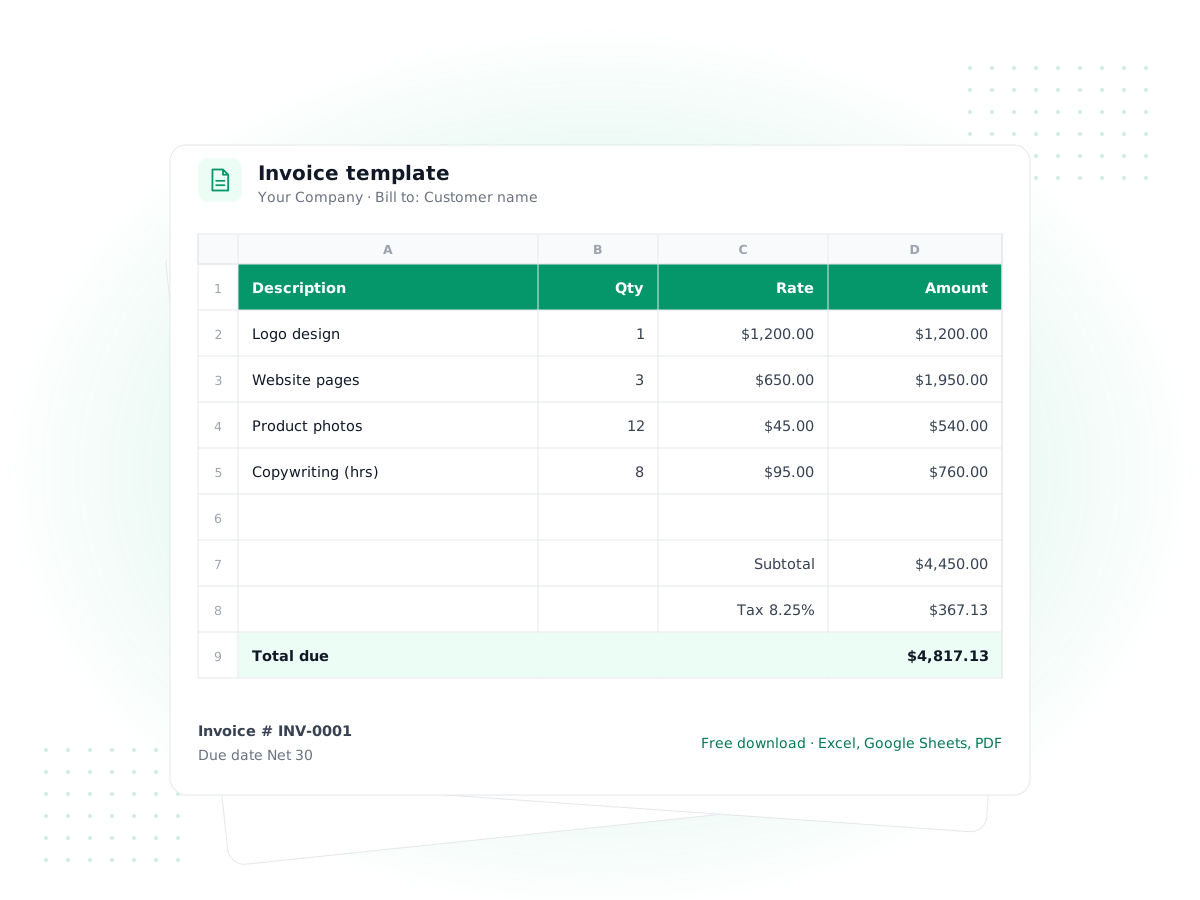
Download your free invoice template
Every Excel file has working formulas for line totals, subtotal, discount, tax and balance due, a print area set to one letter-size page, and a 'How to use' tab.
- Excel (.xlsx)
Simple invoice template
For most small businesses selling products or fixed-price work
Description, quantity and unit price per line, with discount %, tax %, shipping, amount paid and balance due.
Download Excel· 9 KB - Excel (.xlsx)
Freelance invoice template
For freelancers and consultants who bill by the hour
One row per work session with date, task, hours and hourly rate. Hours × rate totals automatically, plus a project field.
Download Excel· 9 KB - Excel (.xlsx)
Service invoice template
For trades and field services: HVAC, cleaning, repairs, landscaping
Service date, work order number and service address, with labor, call-out fees and parts on separate lines. Due on receipt by default.
Download Excel· 9 KB - PDF
Printable invoice template (PDF)
For anyone who wants to print and write, or type into a PDF
Letter-size form with fillable fields. Type into it in a PDF reader, or print it and fill it in by hand. You add up the totals yourself.
Download PDF· 47 KB
Free to use for your own business. No sign-up or email required. Excel files also open in Google Sheets, LibreOffice and Apple Numbers.
How to fill in a free invoice template
An invoice is a request for payment that also serves as your record of the sale. Whichever free invoice template you download, fill it in from top to bottom in this order:
- Add your details and logo. Your business name, address, email and phone go in the "From" block. In the Excel files, click the "Your Logo" box, delete the text and insert your image over it.
- Number the invoice. Use a simple sequence such as INV-0001, INV-0002. Never reuse a number, even if you cancel an invoice, because gaps and duplicates are the first thing an accountant or tax office asks about.
- Set the dates and terms. The invoice date is the day you issue it. "Net 30" means payment is due 30 days later, and the Excel template works out the due date for you. Change the formula if your terms are Net 14 or due on receipt.
- Fill in "Bill to". Use the client's legal or company name and the address they want on their records. Add a purchase order number in the notes if they gave you one.
- List each line item. One row per product, service or block of time, with quantity and unit price. Delete the sample rows first.
- Set discount and tax. Enter a percentage in the yellow cells. Tax is calculated after the discount. Enter 0% if you don't charge sales tax.
- Write payment instructions. Say exactly how to pay (bank transfer details, check payable to, or a payment link you already use) and ask for the invoice number as the reference.
- Save as PDF and send. Keep the Excel original, export a PDF, and email the PDF so the client can't accidentally edit the numbers.
Which free invoice template fits your business
All four downloads share the same layout, so clients see a consistent document whichever you pick. The difference is in the line items.
The simple invoice template is the default. Each row is a description, a quantity and a unit price, which suits products, fixed-price projects and retainers. If you're not sure which to use, start here.
The freelance invoice template is built around time. Each row has a date, the work you did, hours as a decimal (1.5 for an hour and a half) and your hourly rate, and the template multiplies hours × rate for you. There's a project field at the top, which helps when one client has several jobs running at once.
The service invoice template is for jobs done at a customer's location. It adds a service date, a work order number and a service address, and its rows mix a call-out fee, labor hours and parts so the customer sees what each part of the bill covers. Payment terms default to due on receipt, which is common for home services.
The printable PDF has the same fields with blank lines. It's handy for writing an invoice on site, or for a business that sends only a few invoices a year.
What to include on an invoice
A simple invoice template is enough as long as it carries the information a client needs to pay you and you need to prove the sale later:
- The word "Invoice" and a unique invoice number
- Your business name and contact details, and the client's
- Invoice date and due date (or payment terms)
- A clear description of each item or service, with quantity, rate and amount
- Subtotal, any discount, tax shown separately, and the total due
- Deposits or payments already received, and the balance left to pay
- How to pay, and who to contact with questions
Some places require more, such as a tax registration number when you charge sales tax or VAT. Check the rules where you and your customer are based.
Worked example: a freelance invoice
Say you're a freelance designer billing a client for a week of work at $80 an hour. You took a $300 deposit upfront, and the client gets a 5% returning-customer discount. Here is how the freelance invoice template totals it:
| Line | Hours | Rate | Amount |
|---|---|---|---|
| Landing page design | 12 | $80.00 | $960.00 |
| Revisions after review | 3.5 | $80.00 | $280.00 |
| Subtotal | $1,240.00 | ||
| Discount (5%) | −$62.00 | ||
| Tax (0%, design services) | $0.00 | ||
| Total | $1,178.00 | ||
| Less deposit paid | −$300.00 | ||
| Balance due | $878.00 |
The client sees exactly what they're paying for, what came off and what's left. Whether design services are taxable depends on your state, so check before setting tax to zero.
For a step-by-step walk-through with more examples, read our guide on how to make an invoice.
Excel or PDF: which invoice template should you use?
The invoice template Excel files are the better choice if you send more than a few invoices. The formulas remove arithmetic mistakes, you can copy last month's invoice and change a few lines, and the files open in Google Sheets, LibreOffice and Apple Numbers too.
The invoice template PDF suits one-off jobs, handwritten invoices at a job site, or anyone without a spreadsheet app. You can type into its fields in most PDF readers, but it won't add up the totals, so double-check your math.
If you want a finished PDF without opening any software, our free invoice generator lets you fill in the same fields in your browser and download the result.
Common invoicing mistakes to avoid
- Vague descriptions. "Consulting – $2,000" invites questions. "Strategy workshop, 2 sessions, Oct 7 and 9" gets paid.
- No due date. Without one, clients treat your invoice as "whenever." State a date, not just "Net 30."
- Mixing tax into prices. Show tax as its own line so the client can claim it back where allowed and you can report what you collected.
- Editing the formulas by accident. Type only in the yellow cells and item rows. If totals look wrong, download a fresh copy.
- Not tracking what's been paid. A folder of PDFs doesn't tell you who owes you what. Keep at least a simple list of invoice numbers, amounts, due dates and payment dates.
When to move from templates to invoicing software
A free invoice template works well for a handful of invoices a month. It starts to strain when you need to know, at a glance, which invoices are overdue, how much clients owe you in total (accounts receivable), and how your sales tie into your books.
That's the point to consider invoicing software. In PilotLedger, invoices use your item catalog and tax rates, carry your logo on branded PDF templates, are emailed with the PDF attached, and can be followed up with payment reminders. When you record a full or partial payment, it posts to your ledger automatically, and the Aged Receivables report shows who is late. On the Starter, Growth and Business plans, clients can view and download their invoices in the customer portal.
To be clear about the limits: PilotLedger doesn't take online card payments on invoices and doesn't send recurring invoices automatically, so you'd still collect payment by bank transfer, check or your existing payment provider. The Free plan covers 10 invoices a month, and the pricing page lists the paid plans.
Frequently asked questions
Is this invoice template really free?
Yes. All four invoice templates are free to download and use for your own business, with no sign-up, email address or watermark. You can edit the layout, colors and wording, and send as many invoices as you like from them. The small PilotLedger footer line can be deleted.
Can I use the Excel invoice template in Google Sheets?
Yes. Upload the .xlsx file to Google Drive and open it with Google Sheets. The formulas for line totals, discount, tax and balance due keep working. It also opens in LibreOffice Calc and Apple Numbers, though the print layout may shift slightly outside Excel.
How do I add my logo to the invoice template?
In the Excel templates, click the "Your Logo" box in the top-left corner, delete the text, then use Insert > Pictures and place your image over the box. In the PDF template, print the form and stamp it, or add the image with a PDF editor before filling it in.
What is the difference between an invoice and an estimate?
An estimate (or quote) is sent before the work to tell a client what it will likely cost; it asks for approval, not payment. An invoice is sent after the sale or work to request payment. Our free estimate templates cover the first step.
How should I number my invoices?
Use one continuous sequence, such as INV-0001, INV-0002, and never skip or reuse a number. Some businesses add the year (2026-001) or a client code. What matters is that every invoice has a unique number so you and your client can match payments to it.
Do I have to charge sales tax on my invoices?
It depends on what you sell and where you and your customer are. Many services are exempt in some US states and taxable in others. Check with your state's tax agency or an accountant, then enter the right rate in the Tax % cell, or 0% if none applies.
Keep exploring
Free tool
Invoice Generator
Make a PDF invoice in a minute
Feature
Invoicing
Branded invoices, reminders and payments
Guide
How to Make an Invoice
Free template
Estimate Templates
Free quote and estimate forms
Free template
Profit & Loss Template
Free P&L statement spreadsheet
Feature
Customer Portal
Clients view invoices and accept quotes
Outgrowing your invoice template?
Send branded invoices, record payments and see who owes you in PilotLedger. Free plan, no credit card required.