Free estimate templates
Free Estimate Template for Excel and PDF
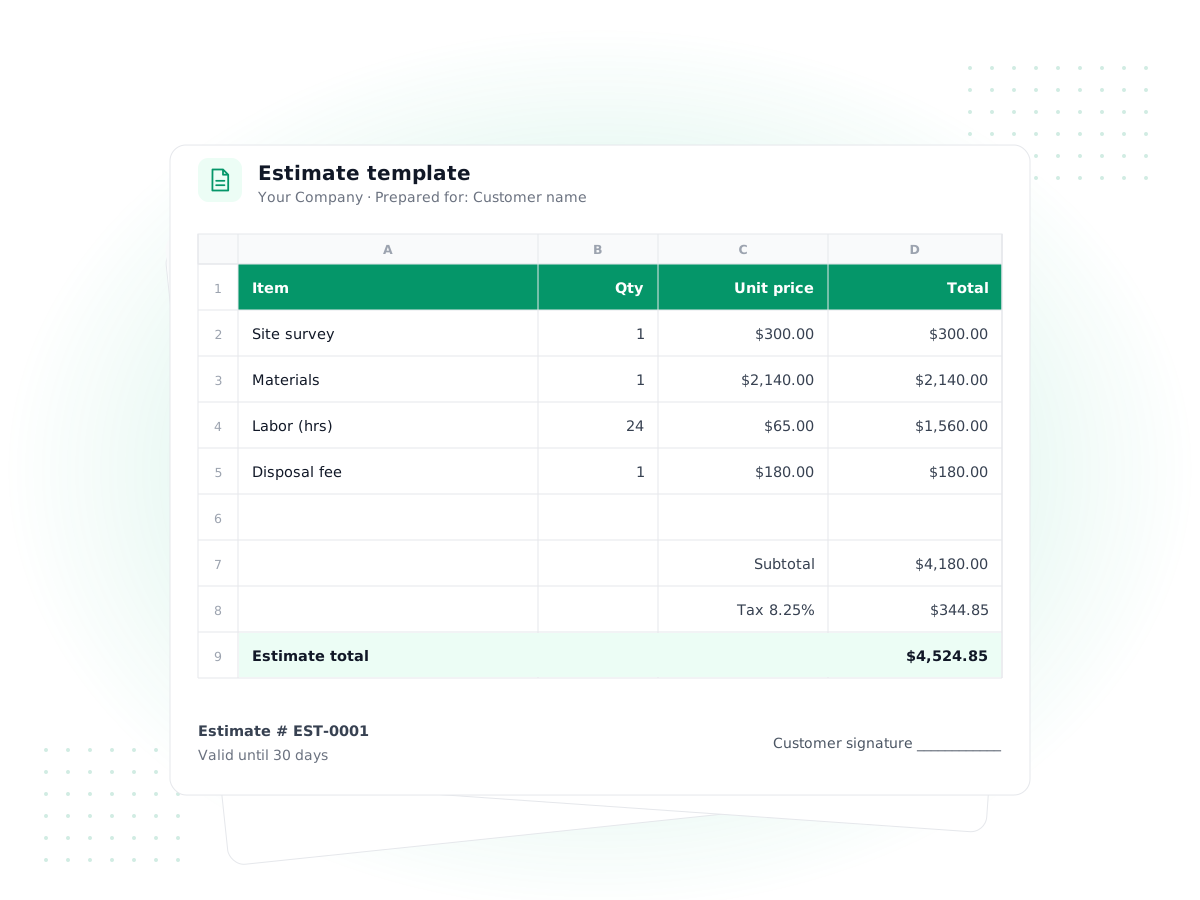
Price a job clearly and get a signature before you start. Download a free estimate template with working totals, a valid-until date and an acceptance line, or the contractor version with separate materials and labor.
Excel and PDF · No sign-up required
Download your free estimate template
The Excel versions calculate line amounts, discount, tax, estimated total and deposit for you. Each includes a 'How to use' tab and prints on one letter-size page.
- Excel (.xlsx)
Simple estimate template
For service businesses, agencies, freelancers and retailers
Line items with quantity and unit price, discount %, tax %, deposit %, a valid-until date and a client acceptance signature block.
Download Excel· 9 KB - Excel (.xlsx)
Contractor estimate template
For contractors, remodelers and trades quoting jobs
Separate materials and labor sections with their own subtotals, overhead and profit %, tax on materials only, deposit, scope and terms.
Download Excel· 10 KB - PDF
Printable estimate template (PDF)
For on-site quotes written by hand or typed into a PDF
Letter-size form with fillable fields, a scope and terms box and a signature line. You calculate the totals yourself.
Download PDF· 45 KB
Free to use for your own business. No sign-up or email required. Excel files also open in Google Sheets, LibreOffice and Apple Numbers.
What an estimate template is for
An estimate tells a client what a job will most likely cost before any work starts. A good estimate template makes that easy to read: what you'll do, what it costs, how long the price holds and how the client says yes. It isn't a request for payment. That comes later, on an invoice.
People use "estimate" and "quote" loosely. In general, an estimate is your best informed guess and can change if the job changes, while a quote is a fixed price for a defined scope. Both templates on this page work for either; just say which one it is in the notes.
How to fill in the free estimate template
- Add your business details and logo. Contractors should include a license number where their state requires it.
- Number and date it. Use a sequence like EST-0001. The "Valid until" date defaults to 30 days after the estimate date; shorten it if your material prices move quickly.
- Fill in "Prepared for". Include the job site address if it's different from the billing address.
- Describe the scope. One or two sentences on what's included, then the exclusions: permits, disposal, painting, anything a client might assume is covered.
- Price each line. Quantity × unit price is calculated for you. Delete the sample rows first.
- Set discount, tax and deposit. Enter percentages in the yellow cells. The deposit line shows how much you need upfront to book the work.
- Ask for a signature. The acceptance block has lines for signature, printed name and date. A signed estimate is your best protection if a dispute comes up later.
How to price a job before you fill in the template
The template does the arithmetic, but the numbers have to come from somewhere. Before you open it, work through the job in this order:
- Walk the job or read the brief twice. Note anything unusual: access problems, old wiring, a tight deadline, a client who wants weekly check-ins.
- List the materials or inputs. Measure, then add a waste allowance (5–10% is typical for flooring and tile) so you don't buy twice.
- Estimate the hours honestly. Break the job into tasks and estimate each one. Small tasks add up, and travel and setup time are real hours.
- Use your real hourly cost. Your rate should cover wages or your own pay, plus the share of insurance, tools and vehicle costs each hour carries.
- Add overhead and profit. This is the line that keeps the business running between jobs. Our markup calculator shows what a given markup means as a profit margin.
- Sense-check the total. Compare it with similar jobs you've done. If it's far off, look for the task you underestimated.
Writing these notes down also helps after the job. Compare the estimate with what the job actually cost and adjust your rates next time.
Contractor estimate template: materials and labor
The contractor estimate template splits the job into two sections because clients, and you, need to see where the money goes.
- Materials: item, unit (each, sq ft, linear ft), quantity and your unit cost.
- Labor: task or trade, number of workers, hours and hourly rate. Amount = workers × hours × rate.
- Overhead and profit: a percentage added to the materials and labor subtotal. Many contractors use something between 10% and 20%; use the figure that actually covers your insurance, vehicles, office time and margin.
- Tax on materials only: in many states, materials are taxable on construction work while labor isn't. The template applies tax to materials only; change the formula if your state treats it differently.
Worked example: a small bathroom refresh
Here's how a contractor might price a vanity and flooring job with the template:
| Line | Qty | Rate | Amount |
|---|---|---|---|
| Vanity with top | 1 | $640.00 | $640.00 |
| Vinyl plank flooring (sq ft) | 55 | $4.20 | $231.00 |
| Materials subtotal | $871.00 | ||
| Demo and haul-away (2 workers × 4 h) | 8 | $55.00 | $440.00 |
| Install vanity and floor (2 workers × 10 h) | 20 | $60.00 | $1,200.00 |
| Labor subtotal | $1,640.00 | ||
| Overhead and profit (15%) | $376.65 | ||
| Tax on materials (7%) | $60.97 | ||
| Estimated total | $2,948.62 | ||
| Deposit (30%) | $884.59 |
The client sees the price, the split between materials and labor, and what they need to pay to get on your schedule.
Estimate template Excel vs PDF
The estimate template Excel files are better if you price jobs often: formulas prevent addition errors, and you can save a copy per client and adjust it when they ask for changes. They open in Google Sheets and Numbers as well.
The PDF suits quick on-site quotes. Print a stack, write the estimate at the kitchen table and leave a copy, or type into the fields on a tablet. It doesn't calculate totals, so add them up twice.
Following up on an estimate
Sending the estimate is only half the work. Keep a short list of every estimate you send: number, client, amount, date sent and valid-until date. A polite check-in a few days after sending, and again a week before it expires, wins jobs that would otherwise drift away. When a client asks for changes, issue a revised estimate with a new number (EST-0012-R1) rather than editing the old file, so there's never confusion about which version they approved.
Common estimating mistakes
- No expiry date. Prices for lumber, parts and your own time change. "Valid until" protects you from honoring a six-month-old number.
- Scope left vague. "Repaint living room" will be read differently by you and your client. List walls, ceilings, trim, number of coats and who moves the furniture.
- Forgetting overhead. Pricing only materials and labor at cost means you work for free on everything else.
- No written acceptance. A verbal yes is easy to forget. Get a signature, or at least an email reply that says "approved."
- Retyping it all into the invoice. Copying lines by hand into one of our invoice templates is where errors creep in.
When to move estimates into software
When estimates turn into a steady flow, the hard part is tracking them: which were sent, which were accepted, and which need a follow-up. That's where quotes and estimates in accounting software help.
In PilotLedger you create a quote from your item catalog and tax rates, email it, and the client can accept it in the customer portal (included on the Starter, Growth and Business plans). An accepted quote converts to an invoice in one click, so nothing is retyped, and the invoice posts to your books when it's sent. There's no e-signature tool or online deposit payment built in, so if you need a formal signed contract or card payments, you'd keep using a separate service for those. You can compare plans on the pricing page.
Frequently asked questions
What should an estimate template include?
Your business details, the client's details and job address, an estimate number and date, a valid-until date, a description of the scope and exclusions, line items with quantities and prices, tax, the estimated total, any deposit required, your terms and a place for the client to sign and date.
Is an estimate legally binding?
An estimate on its own is usually treated as an informed guess, not a contract. Once a client signs an estimate that sets out scope, price and terms, it can work as an agreement. Rules vary by state and type of work, so ask a local attorney if the job is large.
How long should an estimate be valid?
Thirty days is a common default and is what the template uses. Shorten it to 7 or 14 days when material prices are volatile or your schedule fills quickly. Lengthen it for slow-moving commercial bids. Whatever you choose, print the actual date rather than just "30 days."
How much markup should a contractor put on an estimate?
There's no single right number. Many small contractors add 10% to 20% for overhead and profit, but the right figure is the one that covers your real overhead plus the margin you need. Our markup calculator shows how markup and margin relate.
Can I turn an estimate into an invoice?
With the templates, copy the accepted lines into one of our free invoice templates and adjust for any changes. In PilotLedger, an accepted quote converts into an invoice in one click with the same lines, prices and tax rates.
Does the estimate template work in Google Sheets?
Yes. Upload the .xlsx file to Google Drive and open it with Google Sheets. The formulas for line amounts, subtotals, tax, total and deposit keep working. It also opens in LibreOffice Calc and Apple Numbers.
Keep exploring
Feature
Quotes & Estimates
Send quotes, convert to invoices in a click
Free template
Invoice Templates
Free Excel and PDF invoices
Free tool
Markup Calculator
Markup, margin and selling price
Feature
Customer Portal
Clients view invoices and accept quotes
Free tool
Invoice Generator
Make a PDF invoice in a minute
Free template
Profit & Loss Template
Free P&L statement spreadsheet
Send quotes clients can accept online
Create a quote in PilotLedger, let the client accept it in their portal (Starter and above) and turn it into an invoice in one click. Free plan available.