Bills & Payables
Accounts payable software that keeps every bill on the books
Record vendor bills, approve them before they hit your books, pay them in full or in part, and apply vendor credits. The Aged Payables report shows exactly what you owe and when.
Free plan available · No credit card required
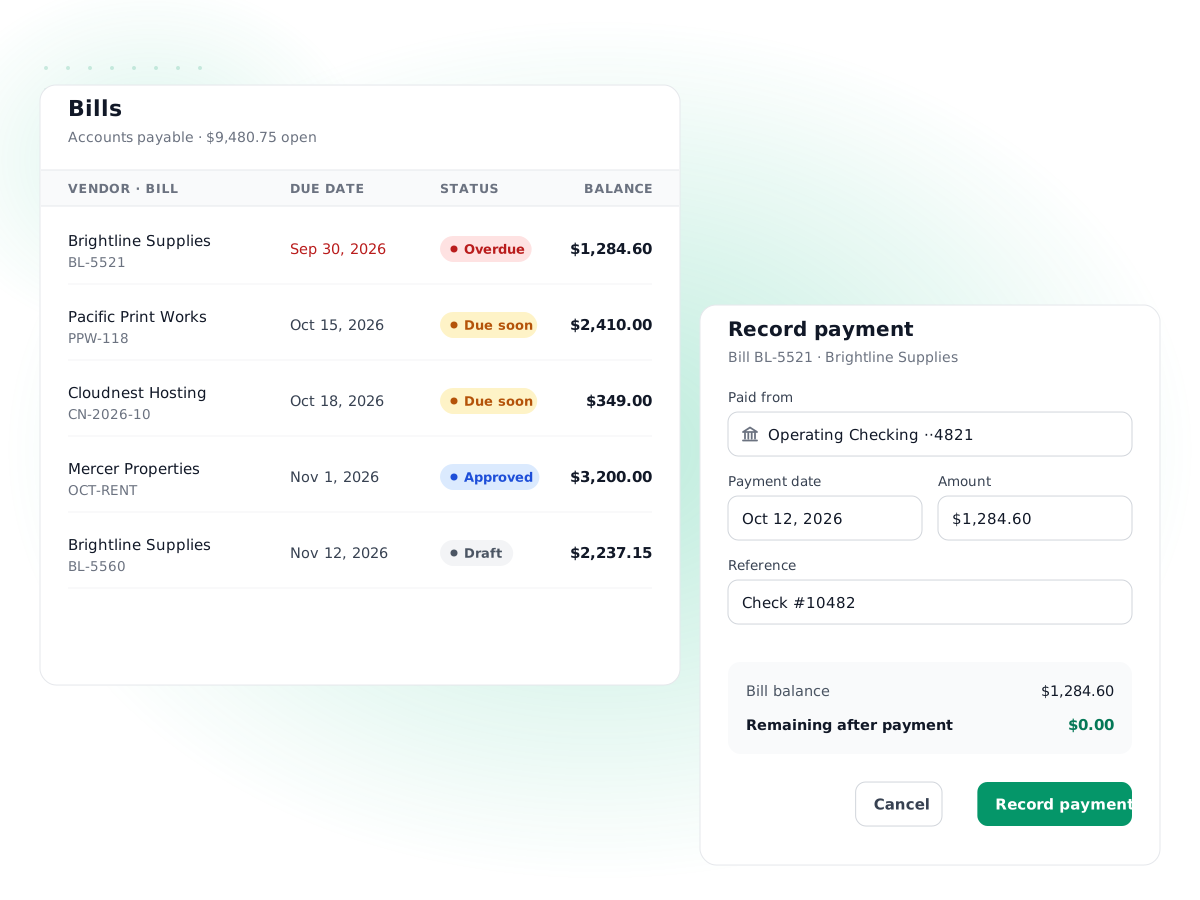
Draft, then approve
Enter a bill as a draft and approve it when it is checked. Only approved bills post to accounts payable.
Line items to any account
Split one vendor invoice across expense, asset or inventory accounts, with tax on each line and a document discount.
Full or partial payments
Pay a bill in installments or pay several bills from one vendor with a single payment from your bank account.
Vendor credits and refunds
Record a credit from a supplier, apply it to an open bill, or record the refund when the vendor sends money back.
Aged Payables report
See what you owe each vendor as current, 1–30, 31–60, 61–90 and 90+ days overdue, as of any date.
Stock bought at cost
Bills for stock-tracked items add quantity to inventory at cost, ready for cost of goods sold when you sell.
How it works
- 1
Enter the vendor bill
Pick the vendor, add their invoice number, bill date and due date, then the line items, accounts and tax.
- 2
Approve it
Save as a draft for review, then approve. Approval posts the bill: expenses or stock are debited and accounts payable credited.
- 3
Pay when it is due
Record a payment from a bank account for all or part of the balance, across one or several of that vendor's bills.
- 4
Apply credits and review
Apply any vendor credits, then check the Aged Payables report to plan the next round of payments.
PilotLedger includes accounts payable software for small businesses that receive invoices from suppliers and want to pay them on time without losing track of what is owed. You record each vendor bill, approve it, pay it in full or in installments, and apply any vendor credits. Every step posts to your general ledger, so accounts payable on your balance sheet always matches the bills you have not paid yet.
Below is how bill management works in PilotLedger, from the moment a supplier invoice arrives to the day it is settled.
What accounts payable is, in plain terms
Accounts payable (AP) is the money your business owes suppliers for things you have received but not yet paid for. If a printing company delivers $2,400 of brochures with 30-day terms, you owe $2,400 from the day the bill arrives. That amount is a liability on your balance sheet until you pay it.
Tracking AP properly does three things for you:
- Cash planning. You know what is due this week, this month and later.
- Accurate profit. Costs show up when you incur them, not only when you pay, which is how accrual accounting works.
- Good supplier relationships. Nothing gets paid twice and nothing gets forgotten.
How bills work in PilotLedger's accounts payable software
A bill in PilotLedger is the supplier's invoice, entered from your side. Each bill has:
- the vendor and the vendor's own invoice number, so you can match it to their statement;
- a bill date and due date;
- line items, each with a description, quantity, price, tax rate and the account it should hit (for example Office Supplies, Equipment, or an inventory item);
- an optional discount and notes.
Bills move through clear statuses: draft, open (approved), partially paid, paid, overdue or void. A draft is only a record; it does not affect your books. When you approve the bill, PilotLedger posts it:
| Account | Debit | Credit |
|---|---|---|
| Marketing expense (the account on the brochure line) | $2,400 | |
| Input tax recoverable (only if the bill includes tax) | tax amount | |
| Accounts payable (the bill total) | $2,400 + tax |
If a line is for a stock-tracked item, it is debited to Inventory instead, and the quantity goes up at cost. Learn more on the inventory page.
Bill approval: why it matters
Approval is a simple control, but it catches real problems: a bill entered with the wrong amount, a duplicate invoice, or a charge nobody ordered. In PilotLedger you can let one person enter bills as drafts and another approve them, using roles and permissions for each user.
Once a bill is approved, PilotLedger protects it:
- It can still be edited, but its total can't drop below what has already been paid or credited.
- A bill with payments or credits can't be sent back to draft or voided until those are removed.
- If you use a lock date for closed periods, bills dated in a locked period can't be changed.
- Every approval, void and edit is recorded in the audit trail.
Paying vendor bills, in full or in part
When it is time to pay, you record a payment made to the vendor:
- Choose the vendor. PilotLedger lists their open bills with the balance due on each.
- Enter the payment date, amount, payment method and the bank account it comes from.
- Apply the amount to one or more bills. You can pay one bill in full, split a payment across several bills, or pay part of a bill now and the rest later.
- Save. PilotLedger debits accounts payable, credits the bank account, updates each bill's status and adds the withdrawal to the bank account's transactions.
For example, a $6,000 equipment bill on 60-day terms might be paid $3,000 now and $3,000 next month. After the first payment the bill shows as partially paid with $3,000 due, and the Aged Payables report reflects the new balance. If you pay a vendor more than their open bills, the extra stays as a credit with that vendor.
Because the payment lands in your bank account in PilotLedger, it is ready to tick off during bank reconciliation.
Vendor credits and refunds
Suppliers issue credits for returns, damaged goods or billing errors. In PilotLedger you record a vendor credit with its own line items and accounts. When issued, it reduces accounts payable and reverses the cost on those lines.
You then have two options:
- Apply it to an open bill from the same vendor, which lowers that bill's balance due.
- Record a refund if the vendor sends you money back, choosing the bank account it arrived in.
This keeps your payables accurate without editing old bills, and the history stays easy to follow.
The Aged Payables report
The Aged Payables report answers the question every owner asks: who do we owe, and how late is it? For any date you choose, it shows each vendor's unpaid balance in columns: current, 1–30, 31–60, 61–90 and over 90 days past due. Approved expenses that are still unpaid are included too, so employee reimbursements don't slip through.
Use it weekly to plan payments, and at month end to check that accounts payable on your balance sheet ties out. It is one of the 11 reports in financial reports, alongside the aging report for customers, Aged Receivables.
A weekly accounts payable routine
A short routine keeps payables under control without much effort:
- Enter bills as they arrive. Add each supplier invoice as a draft the day it comes in, with the vendor's invoice number so duplicates are easy to spot.
- Approve in one sitting. Once or twice a week, the approver reviews drafts against purchase orders or delivery notes and approves them.
- Check what is due. Filter bills by due date or open the Aged Payables report to see what falls due in the next seven to fourteen days.
- Pay and record. Pay through your bank, then record each payment in PilotLedger against the right bills, the same day.
- Match vendor statements monthly. Compare each major supplier's statement with their balance in PilotLedger and chase any difference.
This keeps your working capital picture accurate: you see the cash you have and the bills that will use it.
Vendors, bills vs. expenses, and current limits
Vendor records
Each vendor in PilotLedger has its contact details, payment terms and currency. Payment terms set the default due date on new bills, and on plans with multi-currency a vendor can be billed in their own currency, with exchange gains or losses recorded when you pay at a different rate. Keeping vendor records tidy means bills are entered faster and payables reports group correctly.
Bills vs. expenses
PilotLedger has both, and each suits a different situation. Use a bill when a supplier sends an invoice with payment terms, several lines, or stock you are buying. Use an expense for a quick cost that is already paid or paid by an employee. Both feed the same reports. See expense tracking for how expenses work.
What PilotLedger's AP does not do
So you can plan around it:
- No bill scanning or email-in. You enter bills by hand; there is no OCR.
- No outgoing payment processing. PilotLedger records payments you make through your bank; it does not send money to vendors.
- No automatic bank feeds. Payments are matched to your statement through reconciliation.
- No recurring bills. Each bill is entered as it arrives.
If you want a broader look at day-to-day bookkeeping, including how AP fits in, read our small business bookkeeping guide. See pricing for which plans include bills and payments made.
Bills & Payables: frequently asked questions
What is accounts payable software?
Accounts payable software records the bills your business receives from suppliers, tracks when each is due, and records the payments you make. In PilotLedger, bills and payments also post to the general ledger automatically, so the accounts payable balance on your balance sheet always equals the unpaid bills, without a separate spreadsheet or month-end adjustment.
Can I pay a vendor bill in installments?
Yes. Record a payment for part of the balance and the bill changes to partially paid, showing what is still due. Record the next payments the same way until it is paid. You can also apply one payment across several open bills from the same vendor, and any amount not applied stays as a credit with that vendor.
Do bills need to be approved?
Bills start as drafts, which don't affect your books. Approving a bill posts it to accounts payable and the accounts on each line. This lets one person enter bills and another review them, using user roles and permissions. You can also approve a bill straight away when you save it if no review is needed.
How do vendor credits work?
Record a vendor credit when a supplier credits you for a return or an error. Issuing it reduces accounts payable and reverses the cost on its lines. Then either apply it to an open bill from that vendor to lower the balance due, or record a refund if the vendor sends money back to your bank account.
Can PilotLedger pay my vendors directly?
No. PilotLedger records payments you make, but it does not move money. Pay your vendor through your bank as usual, by transfer, check or card, then record the payment in PilotLedger against the bill. The payment updates the bill, accounts payable and your bank account balance, and is ready to reconcile against your bank statement.
Which report shows what I owe suppliers?
The Aged Payables report. For any date, it lists each vendor's unpaid balance split into current, 1–30, 31–60, 61–90 and over 90 days past due, and includes approved expenses not yet paid. Use it to plan payments and to check that accounts payable on your balance sheet matches the bills outstanding.
Keep exploring
Try bills & payables in PilotLedger
Create your free PilotLedger account in under a minute. No credit card required.