Inventory
Inventory and Accounting Software for Small Business
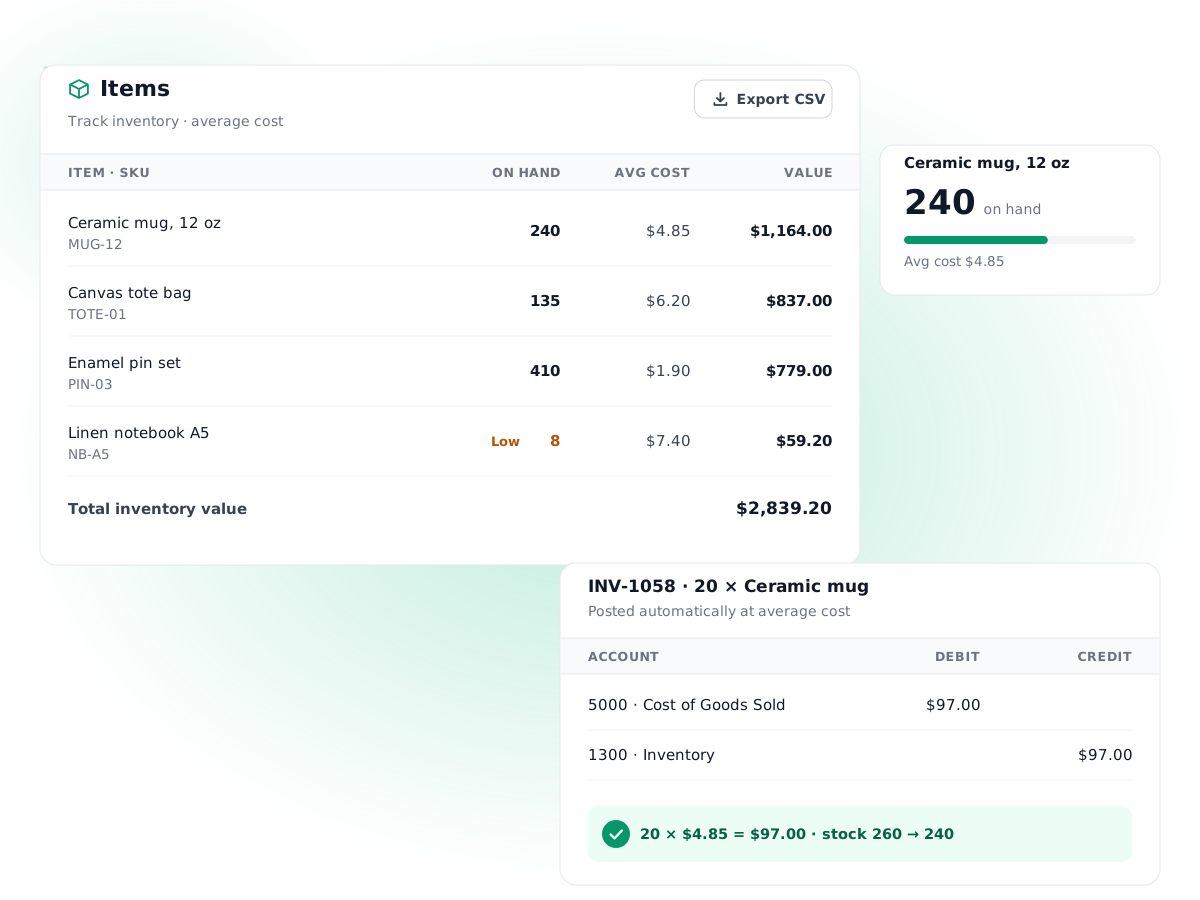
Turn on Track inventory for a product and PilotLedger keeps its stock count, average cost and cost of goods sold in step with every bill and invoice. No separate stock app, no month-end COGS spreadsheet.
Free plan available · No credit card required
Perpetual stock counts
Stock goes up when you enter a bill and down when you send an invoice, so the on-hand quantity is always current.
Weighted average cost
Each purchase updates the item's average cost, blending what you already hold with what you just bought.
Automatic COGS entries
Every invoice for a tracked item posts Dr Cost of Goods Sold and Cr Inventory at average cost, without a manual journal.
Returns handled both ways
Credit notes put stock back at the cost it left at; vendor credits take returned stock out of inventory.
Low stock alerts
Set a reorder level per item and PilotLedger flags it as low stock when the count falls to that level.
CSV import and export
Load your product list, prices, costs and starting stock from a spreadsheet, and export it again any time.
How it works
- 1
Add your items
Create products and services, or import them by CSV. Tick Track inventory on the products you hold in stock.
- 2
Buy stock with bills
Enter vendor bills for tracked items. Quantity increases and the purchase cost posts to your Inventory asset account.
- 3
Sell with invoices
Invoice customers as usual. Stock drops and cost of goods sold posts at the item's average cost when the invoice is sent.
- 4
Read the results
See cost of goods sold on the profit and loss report, inventory value on the balance sheet and best sellers in Sales by Item.
Inventory and accounting software for small business should do one thing well: keep the stock count and the books telling the same story. In many small shops they drift apart. The stock list lives in one spreadsheet, the accounting in another app, and cost of goods sold is a guess at year end. PilotLedger keeps both in one place with a perpetual inventory that updates your general ledger every time you buy or sell a tracked product.
It is built for small product businesses, makers, resellers and service firms that also sell some parts or materials, not for warehouses with barcode scanners and multiple locations.
How inventory accounting software works in PilotLedger
Every product or service you sell lives in the item catalog with a name, SKU, unit, sale price and cost. For products you physically stock, tick Track inventory. From then on, documents you already create do the work:
- A vendor bill for a tracked item adds the quantity to stock and posts the cost to your Inventory asset account instead of an expense.
- A sent invoice removes the quantity from stock and posts cost of goods sold at the item's average cost.
- A credit note to a customer returns the quantity to stock at the same cost it left at.
- A vendor credit for returned goods takes the quantity back out of stock.
Edit or void any of these documents and the stock movement and ledger entry are corrected to match. Draft invoices and bills do not move stock until they are issued.
A perpetual inventory system, not a periodic one
A perpetual inventory system updates stock and cost with every transaction. A periodic system waits until you count stock at the end of a period and works out cost of goods sold from the difference. Periodic is simpler on paper, but it means your profit and loss report is wrong every month until the count.
With a perpetual system, your gross profit is right the day you invoice. That matters when you are pricing, deciding what to reorder, or showing a lender monthly numbers.
Average cost and cost of goods sold tracking, with an example
PilotLedger values stock using weighted average cost. Each time you buy more, the new average blends the value already on hand with the new purchase. Here is a coffee roaster selling branded mugs.
| Step | Quantity | Unit cost | Stock on hand | Average cost | Ledger entry |
|---|---|---|---|---|---|
| Bill: buy 100 mugs | +100 | $4.00 | 100 | $4.00 | Dr Inventory $400 / Cr Accounts payable $400 |
| Bill: buy 50 more mugs | +50 | $5.50 | 150 | $4.50 | Dr Inventory $275 / Cr Accounts payable $275 |
| Invoice: sell 30 mugs at $12 | −30 | $4.50 | 120 | $4.50 | Dr COGS $135 / Cr Inventory $135 |
The second purchase lifts the average to $4.50, because ($400 + $275) ÷ 150 = $4.50. When 30 mugs are invoiced for $360, PilotLedger posts the sale to revenue and, in a separate entry, $135 of cost of goods sold. Your profit and loss report shows $360 of revenue and $135 on the Cost of Goods Sold line, which is $225 of gross profit, a gross margin of 62.5%. The balance sheet shows 120 mugs worth $540 in inventory.
Once an invoice has posted its cost, that cost stays fixed even if later purchases change the average, so last month's gross profit does not shift under you. If you want to set prices from cost, the free markup calculator converts between markup and margin.
What you see in reports
Inventory flows through to the reports you already use. The profit and loss report shows cost of goods sold as its own expense account, so you can read gross profit at a glance. The balance sheet shows the value of stock on hand as an asset. The Sales by Item report lists quantity sold and revenue per product, and the item page shows current stock, average cost and whether it has hit its reorder level. See all eleven on the financial reports page.
You can choose a specific expense account for each item's cost of goods sold, for example separate COGS accounts for retail and wholesale lines, or leave the default Cost of Goods Sold account. The chart of accounts guide explains how to set those up.
Setting up inventory when you already have stock
If you already hold stock, enter each item's current quantity and cost when you create it or in the CSV import. Then record the value of that stock as an opening balance on your Inventory account, so the balance sheet matches the shelves. From that point, bills and invoices keep both in step. The double-entry accounting page explains how opening balances work.
Inventory accounting software vs a stock spreadsheet
| Task | Stock spreadsheet plus separate books | PilotLedger |
|---|---|---|
| Update stock after a purchase | Type it in by hand | Happens when you enter the bill |
| Update stock after a sale | Type it in by hand | Happens when you send the invoice |
| Work out cost of goods sold | Month-end or year-end calculation | Posted with every invoice |
| Keep the balance sheet inventory value right | Manual journal entry | Always matches the item records |
| Handle a customer return | Fix two files | Issue a credit note |
| Spot items running low | Filter and eyeball | Low stock badge at the reorder level |
The spreadsheet approach works for a handful of products. Past that, the double typing is where errors creep in, and those errors land straight in your gross profit.
Services and non-tracked items
Not everything in your item catalog needs stock tracking. Services like labor, delivery or consulting hours stay as normal items with a price and an income account, and invoices for them post revenue only. You can also leave low-value consumables untracked and expense them through bills as usual. Mixing tracked products and untracked services on the same invoice is fine; only the tracked lines move stock and post cost of goods sold.
Is this the right inventory and accounting software for your small business?
PilotLedger inventory is deliberately simple. It uses average cost only, with no FIFO or specific identification. There is one stock count per item, with no multiple warehouses or locations, no serial or batch numbers, no barcode scanning, no purchase orders, no assemblies or bills of materials, and no dedicated stock-count or write-off screen. Shrinkage or damaged goods are corrected by adjusting the item's quantity and posting a journal entry for the value. If you need those features, a dedicated inventory system alongside your accounting will serve you better.
For most small sellers with dozens or a few hundred products, it covers what matters: accurate stock, accurate cost and accurate profit. See what each plan includes on the pricing page.
Inventory: frequently asked questions
What is inventory and accounting software?
It is accounting software that also tracks the products you hold for sale, so stock quantities and their value stay in the same books as your sales and purchases. In PilotLedger, bills add stock, invoices remove it, and cost of goods sold posts automatically, so your profit and balance sheet reflect your inventory without a separate app.
Which costing method does PilotLedger use?
PilotLedger uses weighted average cost. Each bill for a tracked item recalculates the average by combining the value already on hand with the new purchase. Invoices then take stock out at that average cost. FIFO, LIFO and specific identification are not available, so check with your accountant if your tax rules require a particular method.
How is cost of goods sold recorded?
When you send an invoice that includes a tracked item, PilotLedger creates a separate ledger entry debiting Cost of Goods Sold and crediting Inventory for the quantity multiplied by the average cost. You can point each item to its own COGS account. Credit notes reverse the entry at the same cost when goods come back.
Is this a perpetual inventory system?
Yes. Stock and cost update with every bill, invoice, credit note and vendor credit, rather than once at the end of a period after a physical count. That keeps your gross profit and inventory value current every day. You should still count stock from time to time and correct any differences you find.
Can I track stock in multiple warehouses?
No. Each item has a single on-hand quantity. PilotLedger does not support multiple locations, bins, serial numbers, batch tracking, barcode scanning, purchase orders or assemblies. It is designed for small businesses that sell from one stock pool and want accurate accounting for it, rather than for warehouse operations.
Can I import my products from a spreadsheet?
Yes. The items list has CSV import and export. The import template includes SKU, name, description, type, category, unit, sale price, cost price, whether to track inventory, current stock and reorder level. Export works the same way, which is handy for price updates or sharing a product list with your accountant.
Try inventory in PilotLedger
Create your free PilotLedger account in under a minute. No credit card required.