Double-entry accounting
Double Entry Accounting Software Without the Busywork
Every invoice, bill, payment and expense in PilotLedger posts balanced debits and credits to a real general ledger. You work in plain business screens; the books stay accountant-grade in the background.
Free plan available · No credit card required
Automatic balanced postings
Invoices, bills, payments, credit notes and expenses create their own ledger entries, so you never type a debit or credit for everyday work.
Editable chart of accounts
Start from a ready-made chart of accounts, then add, rename, group under parent accounts or deactivate accounts to fit your business.
Manual journal entries
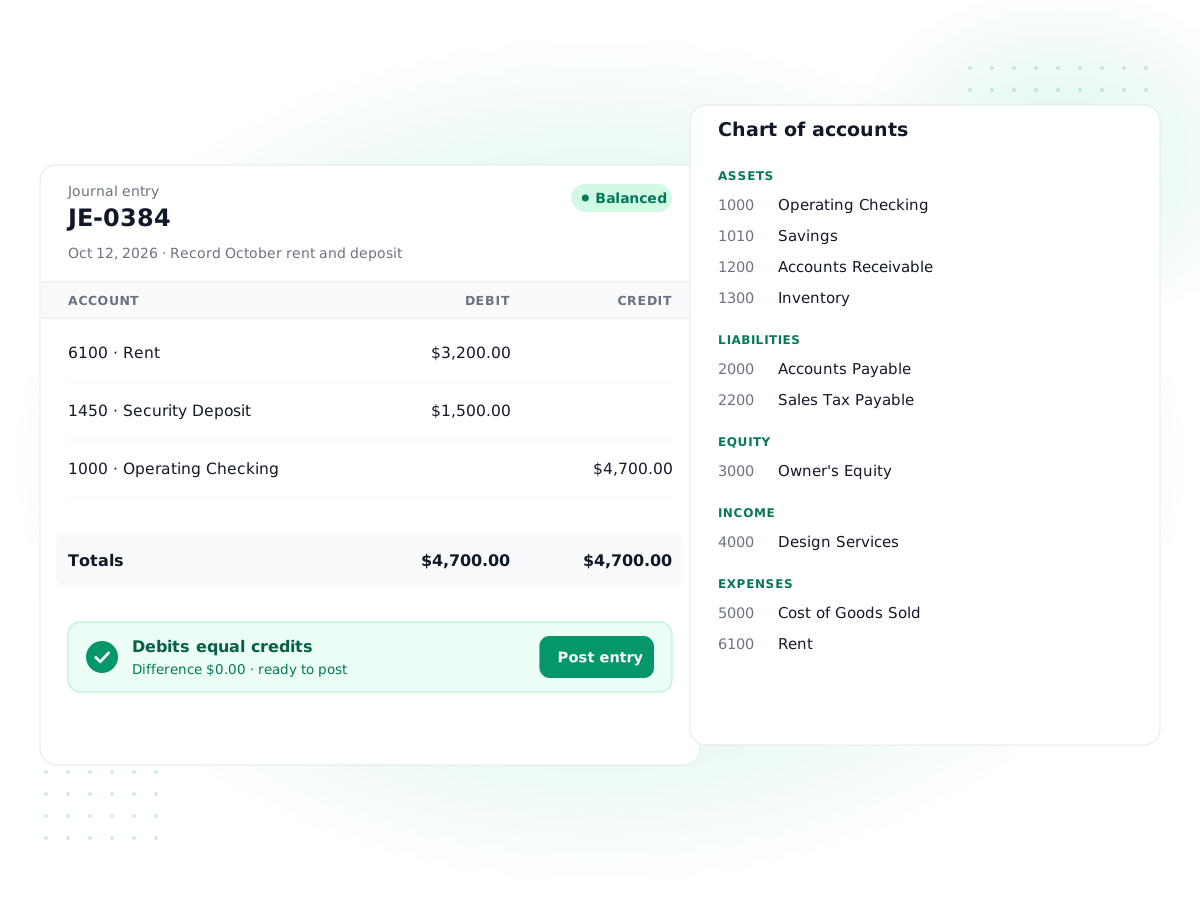
Record adjustments, accruals and corrections with journal entries that cannot be posted until debits equal credits.
Full general ledger
See every posted line by account with its date, entry, description, debit and credit, and trace any report total to its source.
Lock dates and period close
On the Business plan, lock the books once a month or quarter is closed, with a checklist that flags drafts and unreconciled accounts first.
Audit log of changes
Changes are recorded with who made them and when, so you and your accountant can review what happened to the books.
How it works
- 1
Set up your accounts
Review the starter chart of accounts, add any accounts you need, and enter opening balances from your last balance sheet.
- 2
Work in normal screens
Send invoices, enter bills and record payments. PilotLedger posts the matching debits and credits for you.
- 3
Adjust with journals
Use journal entries for depreciation, accruals or reclassifications. The form shows the difference until it balances.
- 4
Close the period
On Business, work through the close checklist, then set a lock date so filed periods cannot change.
Double entry accounting software records every transaction twice: once as a debit to one account and once as an equal credit to another. That rule is what keeps your books honest. If the two sides do not match, something is missing, and the software tells you before a wrong number reaches your reports. PilotLedger is built on this model from the ground up, with a general ledger behind every invoice, bill and payment.
You do not need to be an accountant to use it. Most of the time you work in ordinary screens, like sending an invoice or paying a vendor, and PilotLedger writes the journal entries for you. When you or your accountant need direct control, the chart of accounts, manual journal entries and general ledger are all there.
What double-entry accounting means in practice
In double-entry accounting, every account has a normal side. Assets and expenses increase with a debit. Liabilities, equity and revenue increase with a credit. Each transaction touches at least two accounts, and the total debits always equal the total credits.
Single-entry bookkeeping, like a spreadsheet of income and expenses, tracks only cash in and out. It cannot tell you how much customers owe, how much you owe vendors, or whether your balance sheet adds up. Double entry can, because it tracks both sides of every event. Our guide to accounting basics covers the theory in more depth.
A worked debit and credit example
Here is what happens behind the scenes when a web designer bills a client $2,500 for a website project, gets paid half upfront, then buys a $300 software license on credit. You only fill in the invoice, the payment and the bill. PilotLedger posts the entries below.
| Event | Account debited | Account credited | Amount |
|---|---|---|---|
| Invoice sent for website project | Accounts receivable | Sales revenue | $2,500 |
| Client pays 50% upfront | Bank | Accounts receivable | $1,250 |
| Bill entered for software license | Software expense | Accounts payable | $300 |
| Bill paid from the bank | Accounts payable | Bank | $300 |
After these four events, accounts receivable shows $1,250 still owed by the client, the bank is up $950, revenue is $2,500, and accounts payable is back to zero. Every line has an equal and opposite partner, so the trial balance balances to the cent. If the invoice included sales tax, PilotLedger would split the credit between revenue and sales tax payable automatically.
Common mistakes double entry prevents
A few errors that are easy to make in a spreadsheet and hard to make in a double-entry ledger:
- Counting income twice. Recording an invoice as income and then recording the payment as income again. In PilotLedger the payment only reduces accounts receivable, so revenue is counted once.
- Losing track of what customers owe. A cash-only log has no receivables balance. The ledger keeps one for every customer, and the aged receivables report shows it by age.
- Mixing up owner money and business money. Money the owner puts in or takes out goes to equity accounts, such as an owner's draw, not to income or expenses, so profit stays accurate.
- Unbalanced corrections. A manual fix that only changes one number throws everything off. Journal entries in PilotLedger cannot be posted unless both sides match.
Chart of accounts you control
The chart of accounts is the list of every bucket your money can sit in. PilotLedger gives each new company a sensible starter chart covering bank, receivables, inventory, payables, sales tax, equity, income and common expenses. From there you can add accounts with your own codes, set a type and sub-type, nest accounts under a parent for tidier reports, and mark old accounts inactive instead of deleting history.
A few system accounts, such as accounts receivable, accounts payable and opening balance equity, are used by the automatic postings and stay in place. If you are not sure how to structure your accounts, read our chart of accounts guide for examples by business type.
Journal entries and the general ledger software view
Manual journal entries are for anything that is not an invoice, bill, payment or expense: monthly depreciation, an accrual for work done but not yet billed, a loan received, or moving a cost to the right account. The journal entry form adds up both columns as you type and shows the difference. You can save a draft at any time, but you cannot post until debits equal credits. Posted entries can be reversed on a date you choose, which leaves a clean trail instead of silently editing history, and you can copy an entry to reuse its lines.
The general ledger report is where everything comes together. It lists every posted line for each account, with the date, entry, description, debit and credit, plus totals per account. When a figure on your financial reports looks off, open the general ledger for that account and you will see exactly which transactions make it up.
How the ledger connects to the rest of PilotLedger
The general ledger is the hub; everything else is a way of feeding it. Invoicing posts to receivables, revenue and sales tax. Bills post to payables and expenses or inventory. Payments move money between the bank and receivables or payables. Bank reconciliation confirms that the bank account in the ledger matches the bank's own record. Inventory posts cost of goods sold. Multi-currency adds exchange gains and losses. Because all of these write to one ledger with the same balancing rule, the reports built on top always agree.
Opening balances for a clean start
If you are moving from a spreadsheet or another system, you do not need to re-enter years of history. Set an opening balance date, then enter each account's balance from your last balance sheet: bank, receivables, payables, loans and so on. The offsetting amount goes to an Opening Balance Equity account, so the ledger stays balanced while you load the numbers. Your accountant can then move that equity to the right place with a single journal entry.
For bank accounts, enter the balance on the opening date and start reconciling from the next statement using bank reconciliation.
Lock dates, period close and the audit log
The chart of accounts, journal entries, general ledger and all 11 reports are on every plan, including Free. Period close is on the Business plan ($69.99/month).
Once a month is reconciled or a tax return is filed, those numbers should not move. Setting a lock date in PilotLedger blocks creating, editing, voiding or deleting anything dated on or before it. Corrections go into an open period instead, which is how accountants expect it to work.
Before you lock, the period-close checklist shows what is still open for that date: draft invoices and bills, draft credit notes, expenses not yet approved, draft journal entries, uncategorized bank transactions, unreconciled bank accounts and any balance in the suspense account. Clear the list, then lock the books.
The audit log records changes across the organization with the user, the action and the date, giving you an audit trail to review when a number changes unexpectedly. Account owners and roles with audit log access can view it.
Roles, permissions and working with your accountant
Bookkeeping is rarely a one-person job for long. PilotLedger lets you add users to your organization, up to the limit on your plan (5 users on Growth, 15 users on Business; Free and Starter are single-user), and give each one a role. A sales assistant might create quotes and invoices but not see the chart of accounts. Your bookkeeper might post journal entries and reconcile bank accounts. Your accountant can be invited as a user with access to the accounting screens and reports, so they work directly in your books instead of waiting for spreadsheets.
Because every change is in the audit log and, on Business, closed periods are protected by the lock date, giving an outside accountant access does not put your filed numbers at risk.
Who this double entry accounting software is for
PilotLedger suits freelancers, agencies, consultants, trades and small product businesses that want real books without a complex enterprise system. It is also a good fit if you are switching from a tool that only tracks income and expenses. See how it compares in our QuickBooks alternative breakdown, or check what each plan includes on the pricing page.
Be aware of the limits: there are no automatic bank feeds, no payroll, and no recurring journal entries, so repeating adjustments are entered or copied each period.
Double-Entry Accounting: frequently asked questions
What is double entry accounting software?
Double entry accounting software records every transaction as at least one debit and an equal credit to different accounts, so the books always balance. It keeps a general ledger, a chart of accounts and journal entries, and produces a balance sheet and profit and loss report from them. PilotLedger posts these entries automatically from invoices, bills, payments and expenses.
Do I need to know debits and credits to use PilotLedger?
No. For everyday work you fill in normal business forms like invoices, bills and payments, and PilotLedger writes the balanced entries for you. You only touch debits and credits when you make a manual journal entry, for example for depreciation or a correction. The journal form shows the running difference, so you cannot post an entry that does not balance.
Can I customize the chart of accounts?
Yes. You can add accounts with your own codes, names, types and sub-types, group them under parent accounts and mark old ones inactive. A small set of system accounts used by automatic postings, such as accounts receivable, accounts payable and opening balance equity, stays in place so invoices, bills and payments always have somewhere to post.
Can I edit a journal entry after posting it?
Draft journal entries can be edited or deleted freely. Once posted, the recommended approach is to reverse the entry on a date you choose, which creates an equal and opposite entry and keeps the history clear, then post a corrected one. Nothing dated on or before your lock date can be changed at all.
How do I bring in balances from my old system?
Choose an opening balance date, usually the start of a month or financial year, and enter each account's balance from your last balance sheet. PilotLedger posts the offset to an Opening Balance Equity account so the ledger stays balanced. After that, enter new transactions from the opening date forward and reconcile your bank from the next statement.
What does the lock date do?
The lock date, on the Business plan, protects closed periods. Once it is set, nothing dated on or before that date can be created, edited, voided or deleted, which keeps filed tax returns and reviewed months stable. Before locking, the period-close checklist lists drafts, unapproved expenses, uncategorized bank transactions and unreconciled accounts that still need attention for that date.
Keep exploring
Feature
Financial Reports
P&L, balance sheet, cash flow and more
Feature
Bank Reconciliation
Match your books to the bank statement
Guide
What Is Double-Entry Accounting? Debits, Credits and Examples
Guide
Chart of Accounts: What It Is, Example and Sample for Small Business
Compare
QuickBooks alternative
PilotLedger
Pricing
Try double-entry accounting in PilotLedger
Create your free PilotLedger account in under a minute. No credit card required.