Bank Reconciliation
Bank reconciliation software that proves your books match
Reconcile each bank account to its statement: enter the ending balance, tick the transactions that cleared, and finish when the difference is zero. Completed periods lock so they stay right.
Free plan available · No credit card required
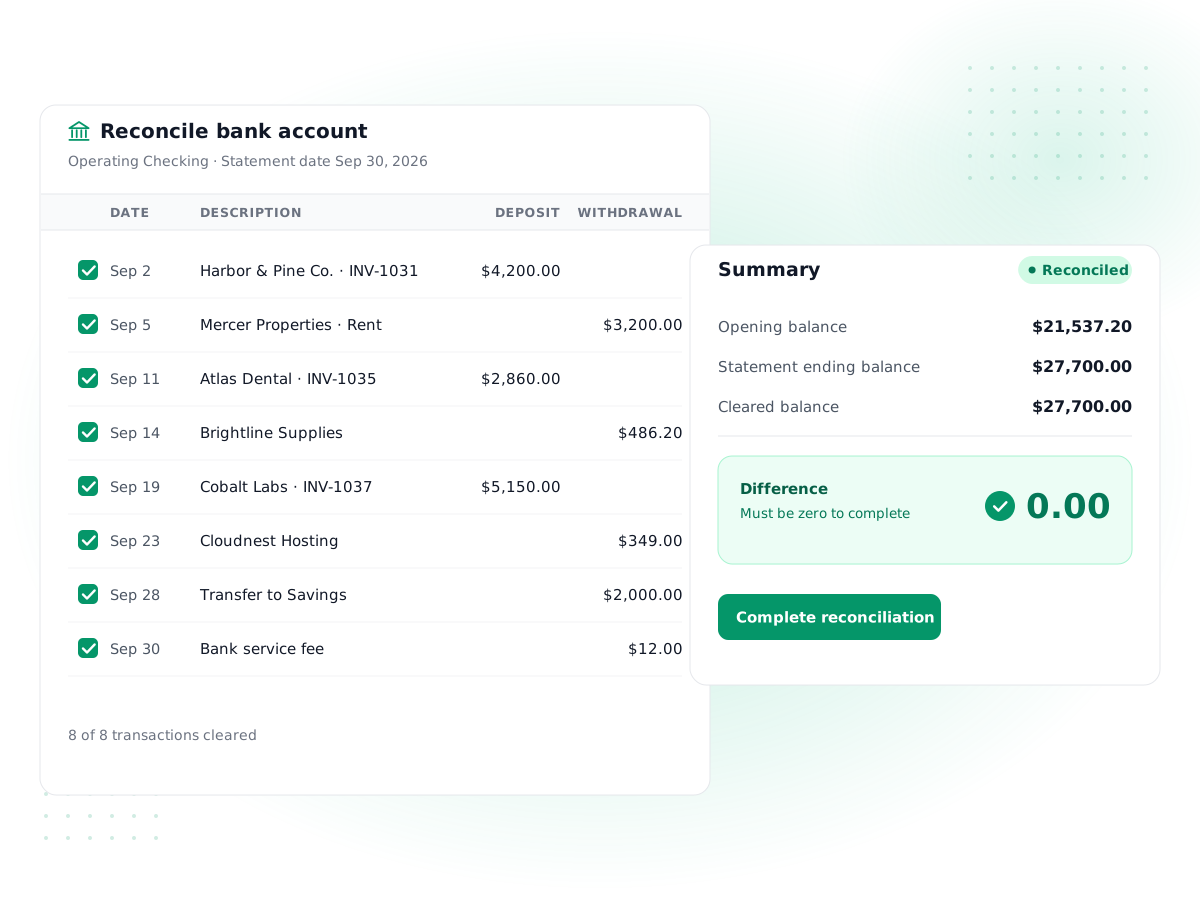
Statement by statement
Start a reconciliation with the statement date and ending balance, then work through that period's transactions.
Live difference
As you tick transactions, PilotLedger recalculates the cleared balance and the difference to the statement, to the cent.
Finish only at zero
A reconciliation can be completed only when the cleared balance equals the statement balance exactly.
Locked once complete
Cleared transactions in a completed reconciliation can't be edited, unticked or deleted, so last month stays reconciled.
Printable reconciliation report
Each completed reconciliation has a report showing cleared and outstanding deposits and withdrawals, ready to print for your records.
Audited reopen
Need to fix something? Reopen the latest reconciliation with a reason, which is recorded in the audit log.
How it works
- 1
Get your bank statement
Download or open the statement for the account and note the statement end date and ending balance.
- 2
Start the reconciliation
In Banking → Reconcile, pick the account and enter the statement date and ending balance.
- 3
Tick what cleared
Tick each transaction that appears on the statement. Add any missing bank fees or interest to the account.
- 4
Complete at zero difference
When the difference reaches 0.00, complete it. The cleared transactions lock and the report is saved.
PilotLedger includes bank reconciliation software that checks your books against your bank statement, one statement at a time. You enter the statement's ending balance, tick the transactions that cleared the bank, and PilotLedger shows the difference until it reaches zero. It is the simplest reliable way to prove that the cash in your accounts matches the cash in the bank, and to catch missing, duplicated or mistyped entries before they spread into your reports.
One thing to know up front: PilotLedger does not connect to your bank. There are no automatic bank feeds. Reconciliation is statement-based, which is how bookkeepers reconciled for decades and how many still prefer to.
What bank reconciliation is and why it matters
Bank reconciliation is the process of comparing the transactions in your accounting records with those on your bank statement for the same period, and explaining every difference.
The two rarely match line for line on any given day, for ordinary reasons:
- Timing. A check you wrote on the 29th may not clear until next month. A deposit you made late on the 31st may appear on the next statement.
- Items the bank recorded first. Monthly fees, interest earned and card charges often show on the statement before anyone records them in the books.
- Errors. A payment typed as $540 instead of $450, a deposit entered twice, or a transaction posted to the wrong account.
Reconciling every month means your balance sheet cash figure is trustworthy, your Profit & Loss isn't missing costs like bank fees, and your accountant can rely on your numbers at year end.
How to reconcile bank statements in PilotLedger
Here is the full process, step by step.
- Make sure the period's transactions are in PilotLedger. Payments you record against invoices, bills and expenses already add a transaction to the bank account you chose. Other deposits and withdrawals can be entered in the bank account and assigned to an account from your chart of accounts.
- Open Banking → Reconcile and choose the account. Each bank or cash account is reconciled separately.
- Start a reconciliation. Enter the statement date and the statement ending balance exactly as printed. Add a note if you like.
- Tick each transaction that appears on the statement. PilotLedger lists every unreconciled transaction dated on or before the statement date, with withdrawals and deposits in separate columns. Your ticks are saved as you go, so you can stop and come back.
- Watch the difference. The cleared balance is your opening balance plus every transaction cleared in earlier reconciliations plus the ones ticked now. The difference is the statement balance minus the cleared balance.
- Fix anything that doesn't match. If the statement shows a $15 monthly fee you haven't recorded, add it to the bank account as a withdrawal assigned to Bank Charges, then tick it. If an amount was entered wrong, correct the source document.
- Complete the reconciliation. When the difference is exactly 0.00, click Complete. Unticked items stay outstanding and carry forward to the next statement.
Transactions dated after the statement date can't be cleared on that statement, and you can't start a new reconciliation dated before the last completed one. Those two rules alone prevent most reconciliation mix-ups.
A worked example
Say your checking account statement for September ends on Sep 30, 2026 with a balance of $18,240.
| Amount | |
|---|---|
| Statement ending balance | $18,240.00 |
| Cleared balance after ticking | $18,255.00 |
| Difference | -$15.00 |
The $15 difference matches a monthly service fee on the statement that nobody recorded. You add a $15 withdrawal to the account, assign it to Bank Charges and tick it. The cleared balance drops to $18,240.00, the difference is 0.00 and you complete the reconciliation.
Your register still shows two items not on the statement: a $1,200 customer deposit made on Sep 30 and a $650 check to a supplier that hasn't cleared. They remain outstanding and will be ticked when they appear on October's statement.
The reconciliation report
Every completed reconciliation has a report you can print or save as PDF from your browser. It shows:
- the statement ending balance, cleared balance and difference;
- the transactions cleared on this statement, split into deposits and withdrawals;
- outstanding deposits and withdrawals not yet on the statement;
- the register balance on the statement date;
- who completed it and when.
That report is what an accountant or auditor asks for when they want to see that cash was reconciled. The reconciliation history for each account lists every completed statement with its balance and number of transactions.
Locking, reopening and the audit trail
Once a reconciliation is complete, the transactions in it are locked. They can't be unticked, edited or deleted, because changing them would silently break a period you already proved. This works alongside PilotLedger's lock date for closing periods, available on the Business plan.
Mistakes still happen, so you can reopen the most recent reconciliation for an account. You must enter a reason, and the reopen is written to the audit trail with the previous completion details. A reconciliation still in progress can simply be discarded, which unticks its transactions.
Statement-based bank reconciliation software vs. bank feeds
Many accounting apps, including QuickBooks Online and Xero, connect to your bank and pull transactions in automatically. That saves typing and is a real advantage if you have hundreds of transactions a month.
PilotLedger takes the statement-based approach:
- You control what enters the books. Nothing appears in your ledger that you didn't record or review.
- No bank credentials are shared with a third-party connection service.
- It works with any bank in any country, because all you need is the statement.
The trade-off is that you enter or record bank activity yourself. For a business with a few dozen transactions a month, that is usually a short job; for high-volume accounts a tool with bank feeds will save more time. Our Xero vs QuickBooks comparison covers those feed-based options fairly.
Where reconciliation fits in your month-end close
Reconciliation is the step that makes the rest of month-end trustworthy. A typical close in PilotLedger looks like this: record the month's invoices, bills, expenses and payments; reconcile every bank and card account; review the trial balance and Profit & Loss; then, on Business, set the lock date so the closed month can't change by accident. Because PilotLedger is double-entry accounting software, a reconciled bank balance also confirms that the other side of each cash entry landed somewhere in the ledger.
Tips to reconcile your bank account faster
- Reconcile monthly, as soon as each statement is available. One month is far easier to fix than six.
- Record payments where they happen. Recording invoice payments, bill payments and paid expenses against the right bank account means most statement lines are already there.
- Set your opening balance correctly when you start using PilotLedger, so the first reconciliation starts from the right number.
- Investigate differences by amount. A difference divisible by 9 often means two digits were swapped; a difference equal to one transaction usually means it was missed or entered twice.
New to the basics? Our small business bookkeeping guide explains where reconciliation fits in a monthly routine, and pricing shows what each plan includes. Bank reconciliation is included from the Starter plan ($14.99/month); it is not part of the Free plan.
Bank Reconciliation: frequently asked questions
Does PilotLedger connect to my bank automatically?
No. PilotLedger has no automatic bank feeds or bank connections. Bank activity comes from payments you record against invoices, bills and expenses, plus deposits and withdrawals you enter in the bank account. You then reconcile each account to its bank statement, which confirms that nothing is missing or duplicated before you close the month.
How do I reconcile a bank statement in PilotLedger?
Open Banking, choose Reconcile for the account, and enter the statement date and ending balance. Tick each transaction that appears on the statement; PilotLedger updates the cleared balance and the difference as you go. Add any missing items such as bank fees. When the difference is exactly zero, complete the reconciliation and the cleared transactions are locked.
What if my reconciliation doesn't balance?
Look at the difference. If it matches a single statement line, that item is probably missing from your books or not ticked. If it is double a transaction, something may be entered twice. A difference divisible by nine often means swapped digits. Correct the entry, tick it, and complete the reconciliation only when the difference reaches zero.
Can I undo a completed reconciliation?
You can reopen the most recent completed reconciliation for an account, but you must enter a reason, and the reopen is recorded in the audit log. Its transactions then become editable again. Older reconciliations can't be reopened while a later one exists, which keeps earlier periods stable. An in-progress reconciliation can simply be discarded.
How often should I reconcile my bank account?
Monthly, as soon as each statement arrives, is the usual practice for small businesses. Reconciling every month keeps errors small and easy to trace, makes your cash balance reliable for decisions, and means your year-end books are ready for your accountant. Busy accounts can be reconciled more often if your bank issues statements more frequently.
Can I reconcile a credit card account?
Yes. In Banking you can set up checking, savings, credit card and other accounts, and reconcile each one against its own statement in the same way. Each account keeps its own reconciliation history and printable reports. Foreign-currency bank accounts come with multi-currency, from the Growth plan ($34.99/month), and are reconciled in the account's own currency.
Keep exploring
Feature
Expense Tracking
Record and categorize every expense
Feature
Bills & Payables
Approve bills and pay vendors on time
Feature
Double-Entry Accounting
Chart of accounts, journals, general ledger
Feature
Financial Reports
P&L, balance sheet, cash flow and more
Guide
Small Business Bookkeeping Guide
PilotLedger
Pricing
Try bank reconciliation in PilotLedger
Create your free PilotLedger account in under a minute. No credit card required.