Invoicing
Invoicing software for business, built on real accounting
Create branded invoices, email them with a PDF link, record full or partial payments and send reminders. Every invoice posts to accounts receivable automatically, so your books stay right without extra work.
Free plan available · No credit card required
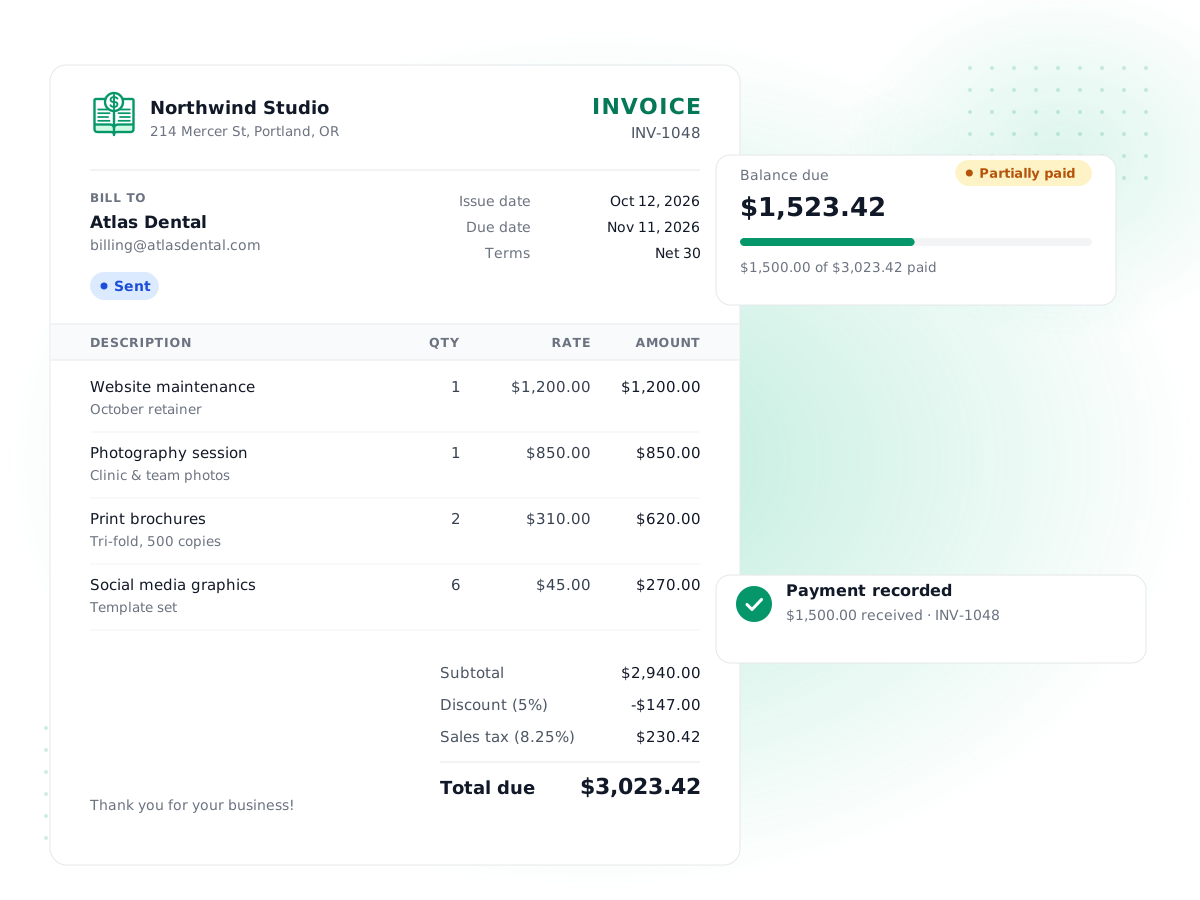
Branded PDF invoices
Design your invoice layout once in Settings → PDF templates with your company details, then every invoice downloads and prints the same way.
Editable email templates
Write the email your customers receive, with placeholders like customer name, invoice number and amount filled in for you.
Partial payments
Record a deposit or an installment and the invoice shows as partially paid with the exact balance still due.
One-click payment reminders
Send a reminder for any sent or overdue invoice. It tells the customer how many days overdue it is and the amount due.
Credit notes and refunds
Issue a credit note for a return or a billing mistake, apply it to an open invoice, or refund it to the customer.
Posts to the ledger for you
Sending an invoice debits accounts receivable and credits revenue and sales tax. Recording a payment moves it from receivables to the bank.
How it works
- 1
Build the invoice
Pick a customer, add products or services from your item catalog, and set quantities, tax rates, a discount, due date and notes.
- 2
Send it by email
PilotLedger emails your template with a secure link to the PDF. The invoice moves from draft to sent and posts to your books.
- 3
Record payments as they arrive
Enter full or partial payments, choose the bank account the money went into, and apply one payment across several invoices.
- 4
Follow up on overdue invoices
Overdue invoices are flagged automatically. Send a reminder, check the Aged Receivables report, or issue a credit note if something changed.
PilotLedger is invoicing software for business owners who want their invoices and their accounting in the same place. You create an invoice, email it, record what the customer pays, and PilotLedger posts every step to a real double-entry ledger. There is no export to an accountant's system and no re-typing at month end: your receivables, revenue and sales tax are already in the books when the invoice goes out.
This page explains how invoicing works in PilotLedger, what it does well, and what it does not do yet, so you can decide whether it fits the way you bill.
What you get with PilotLedger invoicing
Invoices in PilotLedger are built from the same pieces you use everywhere else in the app:
- Customers with their own address, email and currency.
- Items from your catalog, so a product or service has the same name, price and income account every time you sell it.
- Tax rates you set up once and pick per line.
- Discounts on the whole invoice, either a percentage or a fixed amount.
- Custom numbering, so invoice numbers follow your own prefix and sequence.
- Notes and terms that print on the invoice, plus internal notes only your team sees.
Each invoice has a clear status: draft, sent, partially paid, paid, overdue or void. Overdue is worked out for you: a sent invoice with a balance left after its due date shows as overdue, without anyone changing it by hand.
If you only need a one-off invoice and no bookkeeping, our free invoice generator may be enough. PilotLedger is for when you want to track who owes you what and keep the accounting straight.
How sending, PDFs and email templates work
When an invoice is ready, you send it from the invoice screen. PilotLedger emails the customer using your invoice email template and includes a secure link to download the PDF. Sending also moves the invoice from draft to sent, which is the moment it posts to your ledger.
You control both pieces of what the customer sees:
- PDF templates. In Settings → PDF templates you edit the HTML layout of your invoice. Placeholders such as company name, address, invoice number, date, customer name, line items and total are filled in from the invoice. Mark one template as the default and every invoice uses it.
- Email templates. In Settings → Email templates you write the subject line and body of the invoice email. The same kind of placeholders work here, so "Invoice INV-0042 from Harbor Design" is written once and filled in automatically.
Every email PilotLedger sends is recorded in the email log, so you can see when an invoice or reminder went out and whether it was delivered to the email service.
Recording payments, including partial payments
Getting paid is where many invoicing tools stop and accounting starts. In PilotLedger they are the same step.
Say you bill a client $1,250 for a website project and they pay 50% upfront. You record a $625 payment against the invoice, choose the bank account it landed in, and the invoice changes to partially paid with $625 still due. When the second half arrives, you record it the same way and the invoice is marked paid.
A few details that save time:
- One payment, several invoices. If a customer pays three invoices with one bank transfer, record a single payment and split it across those invoices.
- Overpayments become credit. Money not applied to an invoice stays on the customer's account as a credit you can apply later or refund.
- No overpaying an invoice by mistake. PilotLedger won't apply more to an invoice than its balance due.
- Bank balances update too. When you pick a bank account, the payment appears in that account's transactions, ready for bank reconciliation.
Payment reminders and overdue invoices
For any invoice that is sent or overdue, you can send a payment reminder with one click. The reminder email includes the invoice number, due date, the amount still due and how many days overdue the invoice is. Reminders are sent when you choose to send them; PilotLedger does not send reminders on a schedule.
To see the whole picture, open the Aged Receivables report. It groups what each customer owes into current, 1–30, 31–60, 61–90 and 90+ days overdue, so you know who to call first. The aging report is one of 11 reports in PilotLedger's financial reporting.
Credit notes, refunds and voids
Mistakes and returns happen. PilotLedger gives you the right tool for each case instead of letting you edit history:
| Situation | What to do in PilotLedger | What happens in the books |
|---|---|---|
| Invoice still a draft | Edit or delete it | Nothing was posted yet |
| Invoice sent, nothing paid, issued in error | Void it, with a reason | The ledger entry is reversed |
| Customer returns part of an order | Issue a credit note and apply it to the invoice | Revenue and receivables go down |
| Customer already paid and wants money back | Issue a credit note, then refund it | Money leaves the bank account you choose |
An invoice with payments recorded can't be voided or sent back to draft, so your receivables never quietly disagree with the cash you received. Every change is written to the audit trail.
Why invoicing inside a double-entry system matters
Most standalone invoicing apps track invoices as a list. That is fine until you need a balance sheet, a tax report or an accountant's sign-off. Then someone has to rebuild the numbers.
PilotLedger is double-entry accounting software, so each invoice is also a journal entry:
- When you send a $1,000 invoice with $80 of sales tax, PilotLedger debits accounts receivable by $1,080, credits revenue by $1,000 and credits sales tax payable by $80.
- When the customer pays, it debits your bank account and credits accounts receivable.
- If the invoice includes stock-tracked items, it also posts cost of goods sold and reduces inventory at average cost.
The result is that your Profit & Loss, Balance Sheet and Tax Summary are correct the moment you invoice. If the accrual idea is new to you, our guide to accounting basics walks through it with examples.
What PilotLedger invoicing does not do yet
We would rather you know this now than after you sign up:
- No recurring invoices. Every invoice is created by you. You can clone an existing invoice to save time, but nothing is generated on a schedule.
- No online card payments. Invoices don't include a "pay by card" button. Customers pay you the way they do today (bank transfer, check, cash), and you record the payment.
- No scheduled reminders. Reminders are sent manually, one invoice at a time.
- No mobile app. PilotLedger runs in the browser on desktop and mobile.
If recurring billing or card payments are essential, tools such as FreshBooks or QuickBooks Online are stronger there; our FreshBooks alternative page compares the two honestly.
How to choose invoicing software for business
Who PilotLedger invoicing is for
PilotLedger fits businesses that bill a manageable number of customers and want clean books without a second system:
- Freelancers and consultants who invoice per project or per month and need to see who has paid.
- Agencies and studios that quote first, then invoice deposits and final balances.
- Trades and service businesses that sell a mix of labor and materials from an item catalog.
- Small product sellers who need invoices to reduce stock and record cost of goods sold.
- Businesses billing abroad, from the Growth plan ($34.99/month), where invoices can be in the customer's currency and exchange gains or losses are recorded.
If your team works with an outside bookkeeper, invite them as a user so they see the same invoices, payments and ledger you do.
What to compare
When you compare small business invoicing software, look beyond the invoice design. Ask whether payments, credits and taxes land in a real ledger, whether you can see who owes you money by age, and what the plan limits are. PilotLedger's Free plan includes 10 invoices a month and unlimited customers with no credit card, and paid plans from $14.99/month remove the invoice cap; see pricing for the current details. If you are new to billing, start with our step-by-step guide on how to make an invoice.
Invoicing: frequently asked questions
Can I send recurring invoices with PilotLedger?
Not yet. PilotLedger does not create invoices on a schedule. To bill the same customer each month, open last month's invoice and use Clone, then update the dates and send it. This takes under a minute, but it is a manual step, so if fully automatic subscription billing is essential for you, a tool with recurring invoices will suit you better today.
Can customers pay invoices online by card?
No. PilotLedger invoices don't include an online card payment button. Your customers pay the way they already do, such as bank transfer, check or cash, and you record the payment against the invoice. Recording takes a few seconds and updates the invoice status, the customer's balance and the bank account in one step.
How do partial payments work?
Record a payment for less than the balance due and the invoice changes to partially paid, showing exactly what is left. Record later payments the same way until it is paid. One payment can also be split across several invoices, and any amount you don't apply stays on the customer's account as a credit to apply or refund later.
Can I customize how my invoices look?
Yes. In Settings → PDF templates you edit the HTML layout of your invoice and fill it with placeholders such as your company name, address, invoice number, customer name, line items and total. You can also edit the email template customers receive, including the subject line. Set one PDF template as the default and every invoice uses it.
Are payment reminders sent automatically?
No. You send a reminder from any invoice that is sent or overdue with one click. The email states the invoice number, due date, amount due and how many days overdue it is. To decide who to remind, use the Aged Receivables report, which groups unpaid invoices by how overdue they are for each customer.
Is PilotLedger's invoicing free?
The Free plan includes invoicing for 1 user, 10 invoices a month, unlimited customers, with no credit card required. Customers are unlimited on every plan. Starter ($14.99/month) removes the invoice cap and adds the customer portal, Growth ($34.99/month) adds 5 users and multi-currency invoicing, and Business ($69.99/month) adds 15 users and period close. Check the pricing page for current prices and features.
Keep exploring
Try invoicing in PilotLedger
Create your free PilotLedger account in under a minute. No credit card required.