Financial reports
Financial Reporting Software That Reads From a Real Ledger
Eleven reports, from profit and loss to aged payables, built from the same double-entry ledger your invoices, bills and payments post to. Pick a date range, check the numbers, then print or export to CSV.
Free plan available · No credit card required
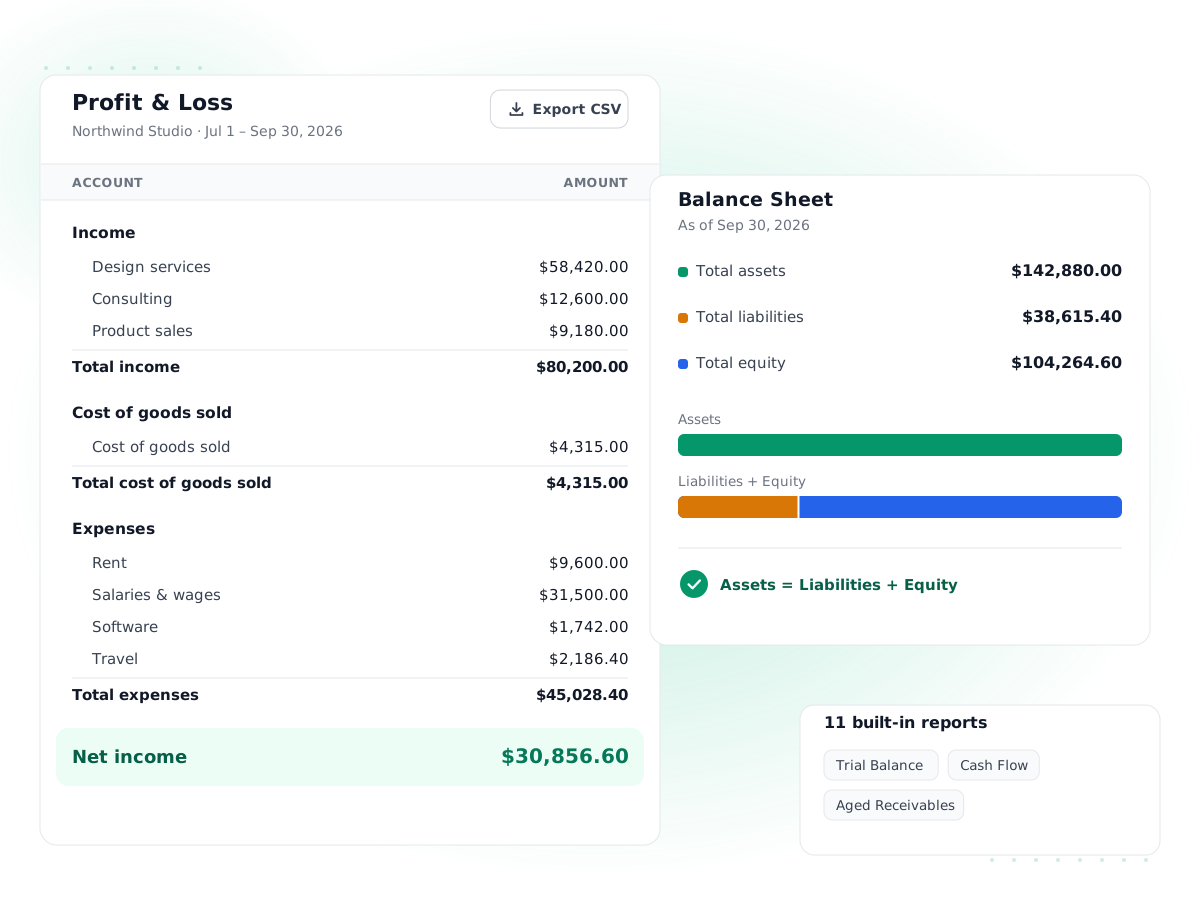
Eleven reports included
Profit and loss, balance sheet, cash flow, trial balance, general ledger, aging, sales, expense and tax reports, all in one Reports menu.
Built from posted entries
Every report reads the general ledger directly, so the balance sheet always balances and the P&L ties to the trial balance.
Any date range
Choose a start and end date for period reports, or an as-of date for the balance sheet and aging reports.
Print or export to CSV
Print a clean copy for the bank or your files, or export the table to CSV to open in Excel or Google Sheets.
Drill into the detail
The general ledger report lists every posted line by account, so you can trace any total back to the invoice, bill or journal behind it.
Accountant-ready
Invite your bookkeeper or accountant as a user, give them a role, and let them run the reports themselves.
How it works
- 1
Record your everyday work
Send invoices, enter bills, record expenses and payments. Each one posts balanced debits and credits to the ledger automatically.
- 2
Reconcile and review
Reconcile your bank accounts to the statement and clear any drafts, so the numbers your reports show are complete.
- 3
Open a report
Go to Reports, pick the report and set the date range or as-of date. The report updates from the ledger on the spot.
- 4
Share or export
Print the report or export it to CSV for your accountant, lender or tax return.
Good financial reporting software should answer simple questions quickly: did we make money this month, what do we own and owe, and who still has to pay us. PilotLedger gives small businesses eleven standard financial reports, each built directly from a double-entry general ledger. There is no separate reporting database to sync and no spreadsheet to rebuild at month end. When you send an invoice or pay a bill, the reports reflect it the moment it is posted.
This page walks through every report, what question it answers, and how to use the numbers to run a small business with fewer surprises.
What financial reporting software does for a small business
Most owners start with a spreadsheet and a bank balance. That works until you have unpaid invoices, bills you have not paid yet, sales tax to file, or a lender asking for a balance sheet. At that point the bank balance stops telling the whole story, because it ignores money you are owed and money you owe.
Financial reporting software solves that by keeping a full set of books and summarizing them on demand. In PilotLedger the books are double-entry: every transaction records a debit and an equal credit. Because every entry balances, the reports built on top of it balance too. If you want the background, our guide to accounting basics explains the model in plain English, and the double-entry accounting page shows how PilotLedger applies it.
The 11 small business financial reports in PilotLedger
| Report | The question it answers | Date setting |
|---|---|---|
| Profit and loss | Did we make or lose money in this period, and where did it come from? | Start and end date |
| Balance sheet | What do we own, what do we owe, and what is left for the owners on this date? | As-of date |
| Cash flow statement | Where did cash come from and where did it go: operations, investing or financing? | Start and end date |
| Trial balance | Do total debits equal total credits, and what is each account's balance? | Start and end date |
| General ledger | Which transactions make up an account's balance? | Date range, one account or all |
| Aged receivables | Which customers owe us, and how overdue is each invoice? | As-of date |
| Aged payables | Which vendors do we owe, and how long have their bills been open? | As-of date |
| Sales by customer | Who are our biggest customers, and how many invoices did each get? | Start and end date |
| Sales by item | Which products and services sell, by quantity and revenue? | Start and end date |
| Expense by category | What did we spend, account by account? | Start and end date |
| Tax summary | How much tax did we charge and pay, by tax rate, for the return? | Start and end date |
Which reports are included depends on your plan. The pricing page lists them plan by plan.
Profit and loss report
The profit and loss report, also called an income statement, lists your revenue and expenses for a period and shows the difference as net income. If you sell stock items, cost of goods sold appears as its own account line under expenses, so you can work out gross profit by subtracting it from sales.
A quick example. A design studio invoices $18,400 in September, records $2,100 of software and contractor costs and $3,900 of rent and other overheads. The profit and loss report shows $18,400 of income, $6,000 of expenses and $12,400 of net profit for the month, even if two of those invoices are still unpaid. That is accrual accounting: income counts when it is earned, not when the cash lands.
New to the format? Read what a profit and loss statement is, or start from our free profit and loss template if you are not ready for software yet.
Balance sheet report
The balance sheet report shows your financial position on a single date: assets on one side, liabilities and equity on the other. PilotLedger calculates retained earnings from prior years and current-year earnings for you, so the report balances without a year-end closing entry.
Use it to check that the bank balance matches your reconciled statement, that accounts receivable looks right, and that sales tax payable matches what you expect to file. Lenders and investors usually ask for this report first.
Cash flow statement
Profit and cash are different things. A business can be profitable on paper and still run short of cash because customers pay late or stock ties up money. The cash flow statement shows the actual movement in your bank and cash accounts for a period, grouped into operating, investing and financing activities. Buying a $4,000 laptop shows under investing; an owner putting $10,000 into the business shows under financing.
Trial balance and general ledger
These two are the accountant's reports. The trial balance lists every account with its debit or credit balance and proves that the totals agree. The general ledger report lists every posted line, by account, with the date, entry, description, debit and credit, plus totals for each account. When a number on the P&L looks wrong, the general ledger is where you find out why, line by line.
Aging, sales, expense and tax reports
The aged receivables report groups unpaid customer invoices into current, 1–30, 31–60, 61–90 and over 90 days past due. Review it weekly and send reminders from invoicing before balances drift into the older columns. The aged payables report does the same for vendor bills, so you can plan payments around due dates.
Sales by customer and sales by item show where revenue comes from. Expense by category shows spending per expense account, which is the fastest way to spot a subscription you forgot about. The tax summary totals tax charged on sales and paid on purchases, by rate, ready for your sales tax return.
A simple monthly reporting routine
Reports are most useful when you read them on a schedule rather than only at tax time. A routine that takes about thirty minutes a month looks like this:
- Reconcile every bank and cash account to the month-end statement.
- Clear drafts: send or delete draft invoices, approve pending expenses, and post or delete draft journal entries.
- Run the profit and loss report for the month and compare it with the previous month by running it again for those dates. Look for any expense line that jumped.
- Run the balance sheet as of the last day of the month. Check that the bank balance matches the statement and that sales tax payable looks right.
- Run aged receivables and follow up on anything over 30 days. Run aged payables and schedule what is due next.
- When the month looks right, set the lock date (on Business) so nobody changes it by accident.
After a few months you will know your normal numbers well enough to spot a problem in seconds: a customer who stopped buying, a cost that crept up, or cash that is lower than profit suggests it should be.
Who uses which report
Different people want different reports from the same books. Owners usually live in the profit and loss, aged receivables and cash flow statement. A bookkeeper spends more time in the trial balance and general ledger, checking that every account looks reasonable before handing over. Your accountant will ask for the trial balance, balance sheet and profit and loss at year end, often as CSV exports. A lender typically wants a balance sheet and profit and loss for the last full year plus the current year to date. Because every report comes from one ledger, they all agree with each other no matter who runs them.
What to expect, and what is not included
Every report supports print and CSV export, and every report reads only posted transactions. Drafts never leak into your numbers. A few honest limits: PilotLedger reports on an accrual basis and does not offer a cash-basis toggle, side-by-side comparison columns, custom report builders, budgets or charts on reports. If you need those, you can export to CSV and build them in a spreadsheet. For most small businesses, the eleven core reports cover monthly reviews, lender requests and year-end handoffs to an accountant.
Reports are only as good as the books behind them. Reconcile your accounts with bank reconciliation each month before you rely on the balance sheet, and lock closed periods so last quarter's numbers do not change after you have filed.
Financial Reports: frequently asked questions
What reports does PilotLedger include?
PilotLedger includes eleven reports: profit and loss, balance sheet, cash flow statement, trial balance, general ledger, aged receivables, aged payables, sales by customer, sales by item, expense by category and tax summary. Each one reads posted entries from the general ledger, so totals always agree between reports. Which reports are available depends on your plan, and the pricing page lists them for each plan.
Can I export financial reports to Excel?
Yes. Every report has an Export CSV button that downloads the table as a CSV file, which opens directly in Excel, Google Sheets or Numbers. Amounts export as numbers rather than text, so you can add formulas or charts straight away. There is also a Print button for a clean paper or PDF copy using your browser's print dialog.
Are the reports on a cash or accrual basis?
Reports are on an accrual basis. Income counts when you issue an invoice and expenses count when you enter a bill, regardless of when cash moves. That matches how most accountants prepare statements. If you want to see cash movement specifically, use the cash flow statement, which only looks at your bank and cash accounts for the period.
Why does my balance sheet always balance?
Because every transaction in PilotLedger is recorded with equal debits and credits. Invoices, bills, payments and manual journal entries all post balanced lines to the general ledger, and the balance sheet is built from those same lines. Current-year earnings and retained earnings are calculated automatically, so you do not need a year-end closing entry for the report to balance.
Can my accountant run reports in PilotLedger?
Yes. Invite your accountant or bookkeeper as a user in your organization and give them a role with report access. They sign in with their own login and can run any report, open the general ledger to trace a balance, and export what they need. The audit log records changes, so you can see who did what.
Can I compare this month with last month in one report?
Not in a single view. Each report covers one date range or one as-of date, and there are no side-by-side comparison columns yet. To compare periods, run the report for each period and export both to CSV, or change the dates and review them one after the other. Custom report builders and budgets are not available either.
Keep exploring
Try financial reports in PilotLedger
Create your free PilotLedger account in under a minute. No credit card required.