Multi-currency
Multi Currency Accounting Software for Global Clients
Invoice a client in euros, pay a supplier in pounds and keep a bank account in Canadian dollars. PilotLedger converts each one at the day's rate and works out exchange gains and losses for you.
Free plan available · No credit card required
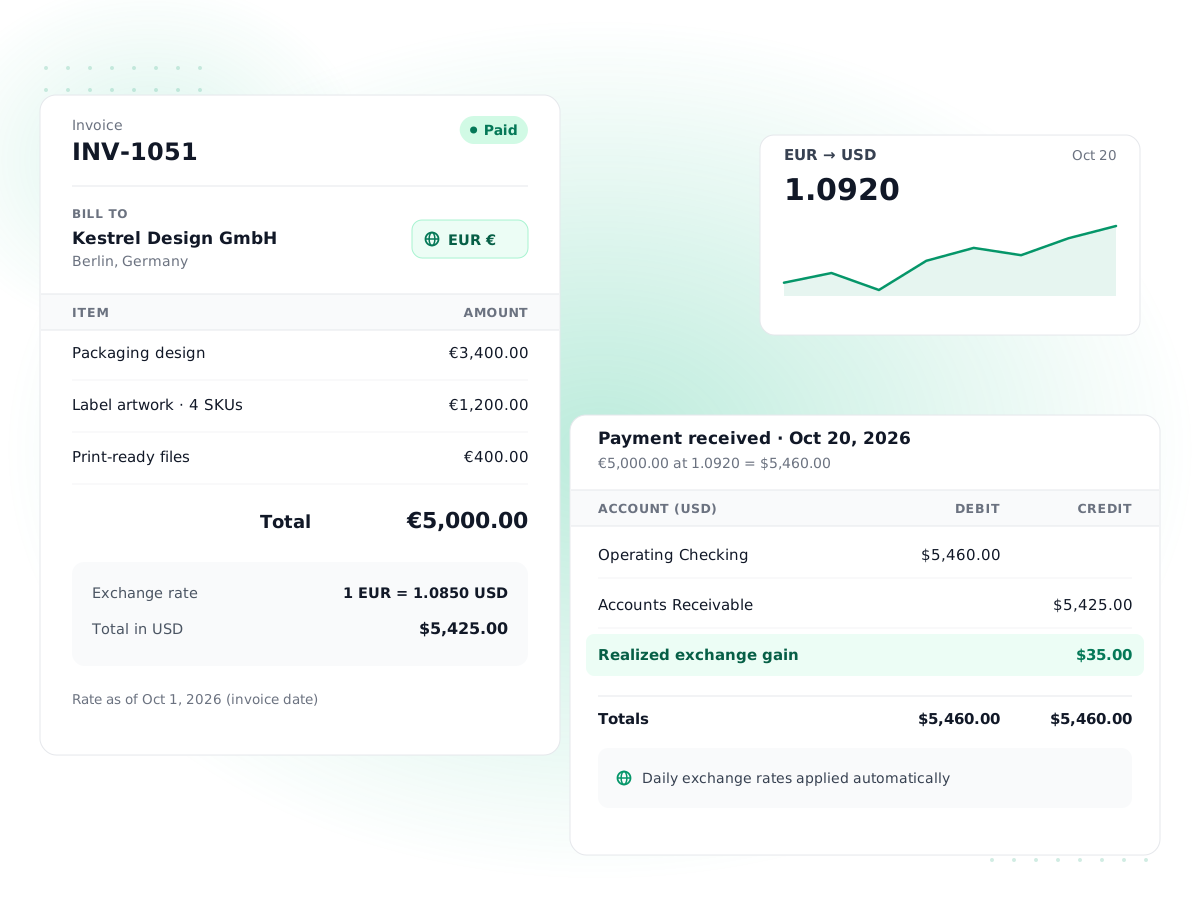
Invoice in their currency
Set a currency per customer and send invoices and quotes priced in it, with the PDF in that currency.
Bills and payments too
Enter vendor bills and record payments in foreign currencies, and hold bank accounts in other currencies.
Daily exchange rates
Rates update automatically every day. You can override the rate on a document or save your own rate for a date.
Realized gains and losses
When a foreign invoice or bill is paid at a different rate, the difference posts to Foreign Exchange Gain/Loss automatically.
Period-end revaluation
Restate open foreign balances at a reporting date's rate and post the unrealized gain or loss, reversed the next day.
Reports in your base currency
Every report stays in your home currency, so profit and loss and the balance sheet add up across all currencies.
How it works
- 1
Turn on currencies
Your base currency is set when you create the company. On a plan with multi-currency, add the other currencies you trade in.
- 2
Assign customer and vendor currencies
Set a currency on each foreign customer or vendor. New invoices and bills pick it up along with the day's rate.
- 3
Record payments as normal
When money arrives or leaves, record the payment. PilotLedger posts any realized exchange difference on its own.
- 4
Revalue at period end
On your reporting date, preview the revaluation, check the rates and post it with one click.
Multi currency accounting software lets you trade in other currencies while keeping one set of books in your home currency. If you invoice clients abroad, buy from overseas suppliers or hold money in a second currency, exchange rates move between the day you issue a document and the day it is paid. PilotLedger tracks that movement for you and posts the gain or loss to the right account, so your reports reflect what actually happened.
Multi-currency is included on the Growth and Business plans, from the Growth plan ($34.99/month) with 5 users. On Free and Starter your books work in a single base currency.
What multi-currency costs elsewhere
Multi-currency is often locked to a higher tier. As of October 2026, QuickBooks Online includes it from Essentials at around $85/month, and Xero only on Established at around $90/month. PilotLedger Growth includes it for $34.99/month ($349.99/year), along with 5 users, the customer portal and bank reconciliation. Those tools add bank feeds and larger ecosystems that PilotLedger does not have, so compare what you will actually use; our QuickBooks alternative page goes through it.
Foreign currency invoicing and bills
Each customer and vendor can have its own currency. When you create an invoice for a German client set to EUR, the invoice, its line items and the PDF your client receives are all in euros. PilotLedger stores the exchange rate for the invoice date and converts the amounts to your base currency for the general ledger. Quotes, credit notes, bills, vendor credits, expenses and payments work the same way.
Bank accounts can be held in a foreign currency too, which helps if you keep a EUR or GBP account for client payments. Transfers between accounts in different currencies record the rate used, so both balances stay right. Everything you already use, from invoicing to bill payments, works with foreign amounts.
Where the exchange rates come from
PilotLedger fetches market exchange rates automatically every day, so new documents pick up a current rate without any typing. If your bank applied a different rate, you can change the rate on the document. You can also save your own rate for a currency and date in Settings, for example to match the rate your accountant uses for month end.
Exchange rate gains and losses, explained
An exchange gain or loss is the difference between the base-currency value of a foreign amount when you recorded it and when it was settled. There are two kinds, and PilotLedger handles both.
A realized gain or loss happens when the money actually moves. An unrealized gain or loss is a paper difference on balances that are still open at a reporting date. Here is a worked example for a US business with a USD base currency.
| Date | Event | Rate (USD per EUR) | Value in USD |
|---|---|---|---|
| March 3 | Invoice a client EUR 5,000 | 1.10 | $5,500 |
| March 31 | Invoice still unpaid at month end | 1.12 | $5,600 |
| April 15 | Client pays EUR 5,000 in full | 1.08 | $5,400 |
On March 31 the open receivable is worth $100 more than when you invoiced it. If you run a revaluation that day, PilotLedger posts a $100 unrealized gain to Unrealized Exchange Gain/Loss so your March balance sheet shows the receivable at today's value. The entry reverses on April 1.
On April 15 the client pays, and the euros are worth $5,400. Measured against the original $5,500, that is a $100 realized loss, which PilotLedger posts to Foreign Exchange Gain/Loss automatically when you record the payment. Because the March revaluation was reversed, the realized figure is always measured from the original invoice rate and nothing is counted twice.
Currency revaluation at period end
The revaluation screen shows every foreign balance still open on the date you choose: unpaid invoices, bills and expenses, unused credit notes and vendor credits, unapplied payments and foreign-currency bank accounts. For each one you see the carrying value, the new rate, the revalued amount and the adjustment. You can review or override the rates before posting.
Posting creates one dated entry to Unrealized Exchange Gain/Loss and an automatic reversal the next day. You can void a revaluation if you need to rerun it. Revaluation respects your lock date, so it cannot change a closed period.
How multi-currency shows up in your reports
All financial reports are in your base currency. Realized and unrealized exchange differences appear on the profit and loss report as their own lines, so you can see how much currency movement cost or earned you in a period. Aged receivables and payables account for foreign balances, and in the customer portal clients see their balance in the currency they were billed in.
Foreign customers and vendors in your reports
Foreign customers are billed and paid in their own currency, and every invoice, credit note and payment keeps its document-currency amount alongside the base-currency value. Aged receivables and aged payables include foreign documents, so overdue balances are not missed. Behind the scenes, accounts receivable and payable in the ledger are kept in your base currency at the rates used on each document, which is why realized gains and period-end revaluation are needed to keep the two views consistent.
Who needs multi currency accounting software
You probably need it if any of these apply: you invoice clients outside your home country and they pay in their own currency; you buy stock, software or contractor time priced in another currency; or you keep a foreign bank account, such as a EUR account for European clients or a GBP account for UK revenue. Freelancers and agencies selling services abroad are the most common users, followed by small importers.
If you only occasionally receive a foreign payment that your bank converts to your home currency before it arrives, you may not need it at all. In that case, invoice in your base currency and record the amount that landed.
A practical month-end checklist for foreign currency
- Record every foreign payment received and made during the month, using the rate your bank applied if it differs from the day's market rate.
- Reconcile each foreign-currency bank account against its statement in that currency.
- Open the revaluation screen, choose the last day of the month and review the rates.
- Post the revaluation so the month-end balance sheet shows open balances at current rates.
- Run the profit and loss report and review the realized and unrealized exchange lines.
- Lock the month once it is reviewed.
What multi-currency does not do
PilotLedger does not process card payments or currency conversion for you; it records what your bank did. There are no automatic bank feeds, so foreign bank transactions are entered or imported by you and reconciled with bank reconciliation. Also, once a document has been paid, its currency cannot be changed, which protects the exchange figures already posted.
Multi-Currency: frequently asked questions
Which plans include multi-currency?
Multi-currency is included on the Growth and Business plans, from the Growth plan ($34.99/month). Free and Starter keep your books in a single base currency. For comparison, QuickBooks Online includes it from around $85/month and Xero from around $90/month. If you upgrade later, your existing base-currency data stays as it is and you can start adding foreign customers, vendors and bank accounts straight away.
Where do the exchange rates come from?
PilotLedger fetches market exchange rates automatically every day from public rate providers, so new invoices, bills and payments get a current rate by default. You can change the rate on any individual document to match what your bank charged, or save your own rate for a currency and date in Settings so it is used instead.
What is the difference between realized and unrealized exchange gains?
A realized gain or loss happens when a foreign invoice or bill is actually paid at a different rate from the one it was recorded at. An unrealized gain or loss is the paper difference on balances still open at a reporting date. PilotLedger posts realized differences automatically on payment and unrealized differences when you run a revaluation.
Why is the revaluation reversed the next day?
Reversing keeps the two kinds of gain separate. The revaluation shows open balances at the reporting date's rate on that date's reports. Reversing it the next day returns the balances to their original rates, so when the invoice or bill is later paid, the realized gain or loss is measured from the original rate and nothing is counted twice.
Can I send invoices in a different currency to each customer?
Yes. Set a currency on each customer record and new invoices and quotes for that customer use it, including the PDF and the amounts shown in the customer portal. Each document stores its own exchange rate to your base currency, so you can bill one client in euros, another in pounds and a third in US dollars.
Can I change my base currency later?
Your base currency is chosen when you create the company and is the currency every report uses. There is no setting to switch it afterward, because changing it would restate every figure in the books. Pick the currency you file taxes and report in, then use multi-currency for customers, vendors and bank accounts in other currencies.
Try multi-currency in PilotLedger
Create your free PilotLedger account in under a minute. No credit card required.